

To watch Kayo Sports outside Australia, connect GatewayVPN to a server in Australia, then sign in at kayosports.com.au in your browser. Kayo only streams to Australian IP addresses, and the VPN gives you one.
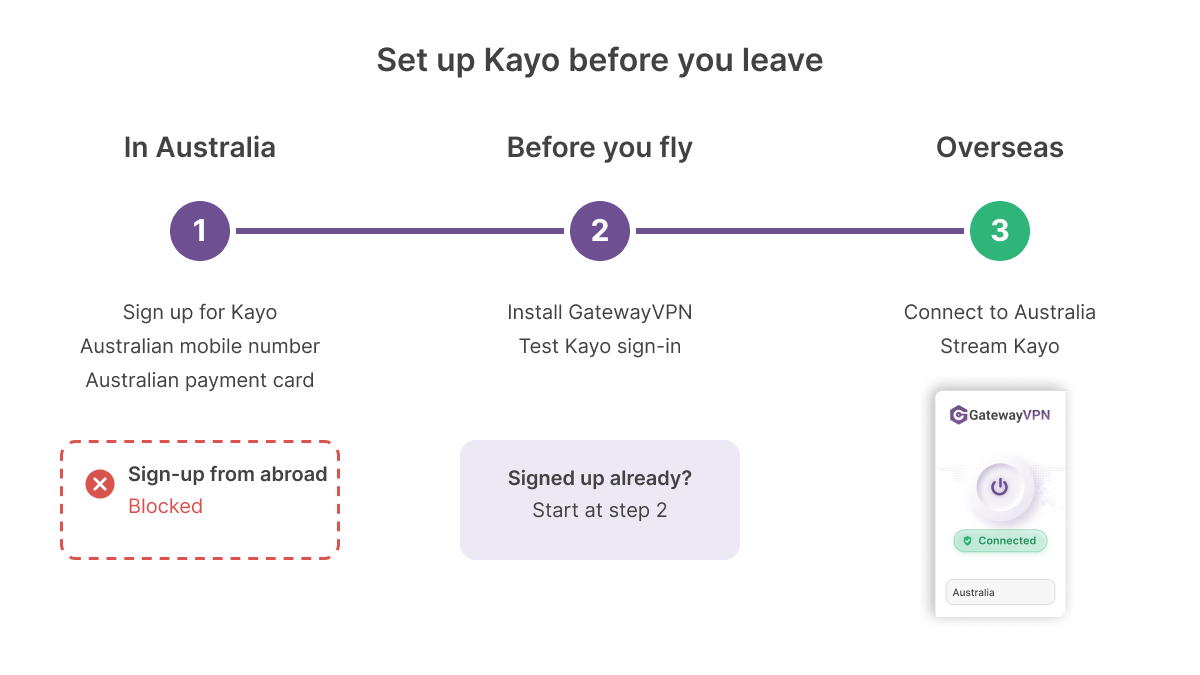
Set up your Kayo account before you leave. Sign-up asks for an Australian mobile number and an Australian payment card.
How to watch Kayo Sports outside Australia
You need two things: a Kayo account and an Australian IP address. GatewayVPN supplies the IP address, and the whole setup runs in your browser.
How to unblock Kayo Sports with GatewayVPN
Follow these five steps. You only do the first two once, ideally while you’re still in Australia.
- Subscribe to Kayo at homeCreate your account in Australia. Already a subscriber? Skip to step 2.
- Install GatewayVPNGet the app on the laptop or phone you’re taking with you.
- Connect to AustraliaOpen GatewayVPN, select Australia in the server list, and connect. On iOS and Android, pick the server with the lowest ping.
- Sign in to KayoGo to kayosports.com.au in your browser. Sign in the same way you signed up, with email or Google.
- Press playChoose a live game or replay from Kayo’s home screen.

The Kayo app is only listed in Australian app stores, and it also reads your phone’s GPS location, according to Top10VPN’s October 2026 tests. Kayo’s website only checks your IP address. So open Safari or Chrome on your phone with GatewayVPN connected.
One sign-in detail trips people up abroad. If you created your Kayo account with Google, the email form won’t accept it, as Gizmodo found in September 2026. Check your sign-in works before you fly.
What you get with GatewayVPN as your VPN for Kayo Sports
A Kayo VPN has one main job: give you an Australian IP address that holds for a full match. Here’s what GatewayVPN adds on top of that.
- Apps for the devices you travel with: native apps for Windows, macOS, iOS, and Android, e.g. your laptop in the hotel and your phone at the airport.
- No bandwidth limits: stream a full day of Test cricket without a data cap on the VPN side.
- Kill switch: a kill switch cuts your internet if the VPN drops, so Kayo never sees your real location mid-game. It’s on Windows, macOS, and Android (VPN always on).
- Split tunneling: split tunneling sends only the apps you choose through the VPN, e.g. your browser through Australia while your local banking app uses your hotel Wi-Fi. It’s on Windows, macOS, and Android.
- 5 devices at once: enough for Kayo Premium’s two streams plus your other devices.
- Room to try it: a 7-day free trial in the iOS and Android apps, and a 30-day money-back guarantee on every plan.
Here’s how to start: install GatewayVPN on your phone or laptop before your flight, then connect to Australia when you land. The 12-month plan works out at $4.99 a month.
Get GatewayVPNWhy is Kayo Sports blocked overseas?
Kayo only holds Australian streaming rights, so it streams only to Australian IP addresses. That rule covers paying Australian subscribers who travel, too.
From overseas, you won’t always see an error. In Gizmodo’s September 2026 test from Europe, kayosports.com.au loaded a blank page. Kayo won’t play until your connection looks Australian.
How Kayo checks your location
Think of your IP address as the postcode on your internet connection. Kayo’s website reads that postcode, and GatewayVPN swaps it for an Australian one.
The phone apps go further. They compare your IP with your GPS location, and they’re missing from app stores outside Australia. A VPN changes your IP address. It doesn’t change your phone’s GPS reading.
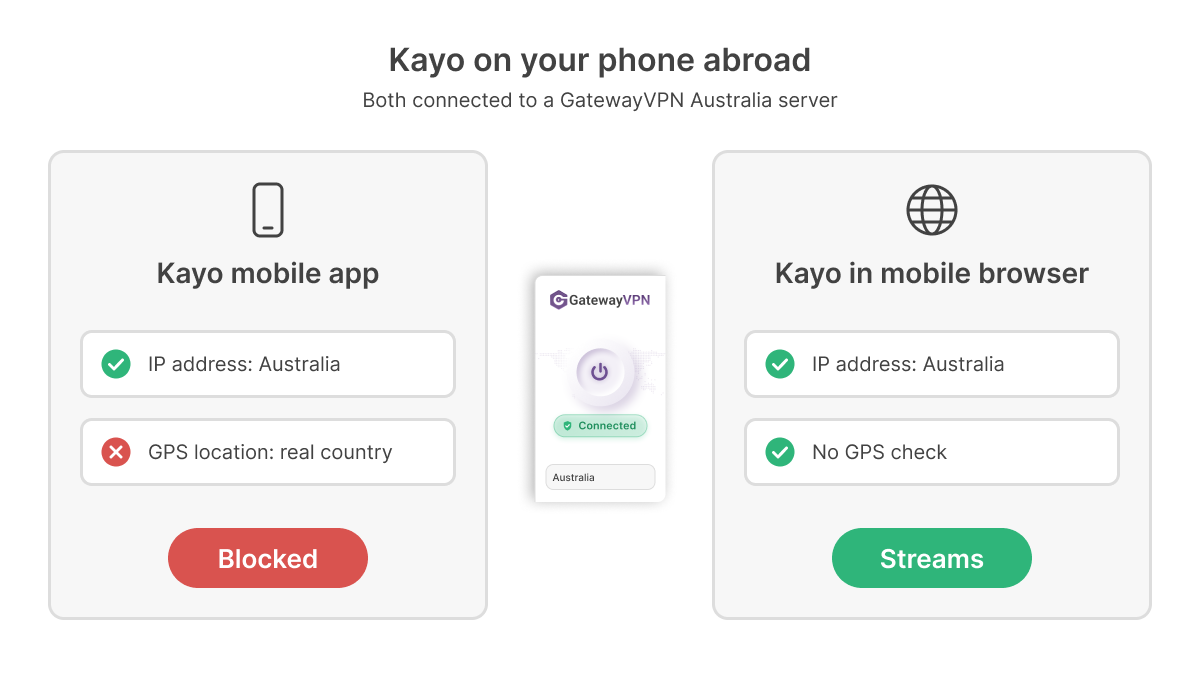
Many guides tell you to install the Kayo app abroad anyway. That route needs an Australian app store account and, on Android, a separate GPS spoofing tool. The browser skips both, so use it.
Can you sign up for Kayo from outside Australia?
Not easily. Kayo’s sign-up asks for an Australian mobile number, and checkout requires a card issued in Australia.
Some guides claim a VPN lets you sign up from anywhere. It changes your IP address, not your phone number or your card’s issuing country. So subscribe before you leave. Kayo has no lock-in contract, so you can cancel when you’re back.
How much is Kayo Sports in 2026?
Kayo has two plans as of October 2026: Standard at A$29.99 a month and Premium at A$45.99 a month. Both prices took effect on 5 February 2026.
| Plan | Price (AUD) | Streams at once | Best quality |
|---|---|---|---|
| Kayo Standard | $29.99/month | 1 | HD |
| Kayo Premium | $45.99/month | 2 (3rd screen add-on available) | 4K on selected events |
Plan details: Finder, May 2026. Prices checked October 2026.
Older guides still quote $25 a month. That price ended when Kayo raised Standard to $30 in June 2025.
Intro offers change often. In September 2026, Gizmodo reported an A$1 first month on Premium and no free trial, so check Kayo’s site before you sign up.
What can you watch on Kayo Sports abroad?
Kayo streams more than 50 sports live and on demand, including AFL, NRL, cricket, Formula 1, MotoGP, Supercars, NBA, and NFL. Most of it comes from Fox Sports and ESPN channels.
Ignore guides that still list beIN Sports. Its content left Kayo in July 2023. Also plan around time zones: a Friday-night NRL game in Sydney lands on Friday morning in Europe.
Only follow one competition? A league’s own service can be cheaper. See our pages for F1 TV and NBA League Pass.
Kayo Sports VPN not working? How to fix it
Most Kayo errors abroad have one of three causes: your IP isn’t Australian, Kayo flagged the server, or you’re using the app instead of the browser. Find your symptom below.
| Problem | Why it happens | Fix |
|---|---|---|
| Blank page on kayosports.com.au | Your IP address isn’t Australian, or the VPN dropped | Connect GatewayVPN to Australia and reload. Turn on the kill switch to stop silent drops. |
| “We have detected you are on a VPN” | Kayo has flagged that server’s IP address | Connect to a different Australian server, clear Kayo’s cookies, and reload. |
| “Access Denied” with a reference number | The IP is shared by too many users, common on free VPNs | Switch to another Australian server. Don’t use a free VPN. |
| Kayo app missing from the app store | The app is only listed in Australian stores | Use kayosports.com.au in your phone’s browser. |
| Kayo app blocks you with the VPN on | The app checks your GPS location | Close the app and use the mobile browser. |
| Buffering or a blurry picture | Long route to Australia or a busy server | Pick a lower-ping server, then switch protocol to WireGuard or turn on the fallback protocol. |
| Sign-in rejected | You’re using a different sign-in method from sign-up | Sign in with Google if you signed up with Google, or with email if you used email. |
Still stuck after two server changes? Restart the GatewayVPN app, reconnect, and open Kayo in a private browser window. That rules out an old cookie pinning you to your real location.
Kayo Sports VPN FAQ
Is it legal to watch Kayo Sports with a VPN?
Using a VPN is legal in most countries. But streaming services set their own location rules, and Kayo limits streaming to Australia. A VPN also doesn’t make you anonymous to Kayo once you sign in with your account.
Can I use a free VPN to watch Kayo Sports overseas?
No. The free tiers of Proton VPN, Windscribe, PrivadoVPN, and Hide.me have no Australian servers. Free VPNs that do offer Australia tend to share each IP between many users, which triggers Kayo’s “Access Denied” error.
Does Kayo work on my phone when I’m abroad?
Yes, in the browser. Connect GatewayVPN to Australia, then open kayosports.com.au in Safari or Chrome. The Kayo app is harder, because it also checks your GPS location.
Can I watch Kayo in 4K from outside Australia?
Yes, on Kayo Premium, which streams selected events in 4K. Your speed to Australia decides the picture, so use WireGuard and the lowest-ping Australian server. GatewayVPN has no bandwidth limits.
Can two people watch Kayo at the same time while traveling?
Yes, with Kayo Premium, which allows two streams at once. GatewayVPN covers 5 devices per account, so both screens can connect to Australia on one subscription.
Does Kayo Sports have a free trial?
Not as of September 2026, according to Gizmodo, which found an A$1 first month on Premium instead. Offers change, so check Kayo’s site. GatewayVPN’s iOS and Android apps include a 7-day free trial.
Watch Kayo Sports abroad on any device with GatewayVPN
The table shows where Kayo runs and how to put each device on an Australian connection. The left side is Kayo’s support; the right side is GatewayVPN’s.
| On Kayo Sports | With GatewayVPN | ||
|---|---|---|---|
| Device | Kayo Sports support | GatewayVPN support | Setup guide |
| Kayo SportsiPhone / iPad | App | GatewayVPNApplication | iOS guide |
| Kayo SportsAndroid phone / tablet | App | GatewayVPNApplication | Android guide |
| Kayo SportsWindows PC | Web browser | GatewayVPNApplication | Windows guide |
| Kayo SportsMac | Web browser | GatewayVPNApplication | macOS guide |
| Kayo SportsApple TV | App | GatewayVPNManual setup | Apple TV guide |
| Kayo SportsAmazon Fire TV | App | GatewayVPNManual setup | Fire TV guide |
| Kayo SportsAndroid TV / Google TV | App | GatewayVPNManual setup | Router guide |
| Kayo SportsChromecast | App | GatewayVPNManual setup | Chromecast guide |
| Kayo SportsSamsung, LG & Hisense smart TVs | App | GatewayVPNManual setup | Smart TV guide |
| Kayo SportsHubbl / Telstra TV | App | GatewayVPNManual setup | Router guide |
| Kayo SportsPlayStation 4 / 5 | App | GatewayVPNManual setup | PlayStation guide |
| Kayo SportsXbox One / Series X|S | Web browser | GatewayVPNManual setup | Xbox guide |
- ApplicationInstall the GatewayVPN app on the device and connect to Australia.
- Manual setupNo GatewayVPN app on the device; connect it through a router or a shared connection.
Kayo device list: Finder, May 2026. Check Kayo’s site for supported models.
Manual setup works two ways. Set up GatewayVPN on a router with a built-in VPN client, following the router guide. Or run the GatewayVPN app on a Windows PC or Mac and share its connection with your TV or console.
Keep in mind that Kayo’s TV apps are only listed in Australian app stores, so install them before you travel. Then install GatewayVPN on your laptop or phone, connect to Australia, and open kayosports.com.au before the first bounce.