
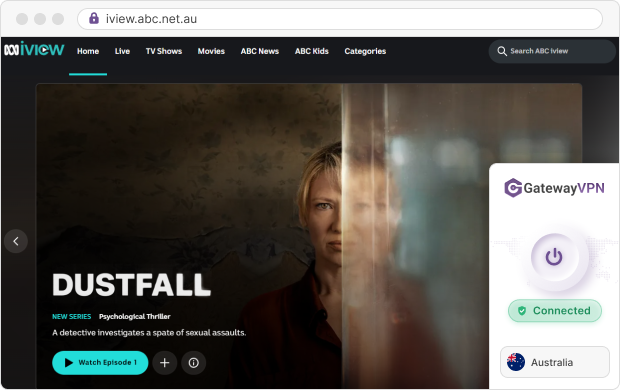
To watch ABC iview outside Australia, connect GatewayVPN to an Australian server, open the ABC iview website, and log in with a free ABC Account. iview checks your IP address, so an Australian IP unlocks the full catch-up library and the live channels.
How to watch ABC iview outside Australia
You need two things: an Australian IP address and a free ABC Account. GatewayVPN handles the first, and the setup takes about five minutes on a laptop or phone.
Unblock ABC iview with GatewayVPN in 5 steps
- Get GatewayVPN
Pick a plan on the GatewayVPN checkout page and install the app on Windows, macOS, iOS, or Android.
- Connect to Australia
Open GatewayVPN, select Australia in the server list, and connect. On iOS and Android, the ping indicator shows which server responds fastest.
- Open ABC iview in your browser
Go to iview.abc.net.au in Chrome, Edge, Firefox, or Safari. The browser works everywhere, unlike the app.
- Log in to your ABC Account
Sign in, or create a free account. You need it for every on-demand program.
- Press play
Pick a series, a premiere, or a live channel. If you see an error, reconnect to a different Australian server.
Watching on iPhone or Android? Start in the browser
The ABC iview app isn’t sold in app stores outside Australia. ABC lists the app only in the Australian App Store and Google Play, for iOS 16+ and Android 7.0+.
So use Safari (iOS 16+) or Chrome (Android 9.0+) instead, with GatewayVPN connected. Already installed the app from an Australian account? It keeps working once your phone has an Australian IP.
Why use GatewayVPN as your VPN for ABC iview?
iview doesn’t need a fast connection. Its best stream is 720p at 4,500 Kbps, about 4.5 Mbps. What matters more is a stable Australian IP and apps on the devices you already use.
Here’s what GatewayVPN gives you for that job:
- No bandwidth limits: stream a whole season without a data cap cutting you off mid-episode.
- Apps for phone and computer: native apps for Windows, macOS, VPN for iOS, and VPN for Android, with up to 5 devices connected at once.
- Kill switch: a VPN kill switch cuts your internet if the VPN drops, so iview never sees your real location mid-stream. It’s on Windows, macOS, and Android.
- Split tunneling: split tunneling sends only chosen apps through the VPN, e.g. your browser through Australia while your banking app stays local. It’s on Windows, macOS, and Android.
- Room to test: a 7-day free trial on iOS and Android, plus a 30-day money-back guarantee on every plan.
Here’s how to start: choose a plan, install the app, and connect to Australia before you open iview.
Why is ABC iview blocked outside Australia?
Licensing. ABC licenses many programs for Australia only, and its help centre explains that broader international rights cost more while its focus is Australian audiences. So iview checks your IP address and blocks playback when it points outside Australia.
That check happens twice for most travelers. First, the app store hides the iview app. Then the website reads your IP. A VPN changes your IP, which solves the second check, and the browser sidesteps the first.
iview also blocks IP addresses it recognizes as VPN servers. Many guides say any Australian server works. In practice, a busy server can get flagged, so if one fails, switch to another Australian server rather than giving up.
Can you watch ABC iview abroad without a VPN?
Partly. ABC runs an ABC Australia category on iview with programs cleared for international viewing. It’s mostly flagship current affairs, not the full catalog.
The ABC NEWS live stream is also available from anywhere without a login, including on YouTube. So if you only want Australian news, you may not need a VPN at all.
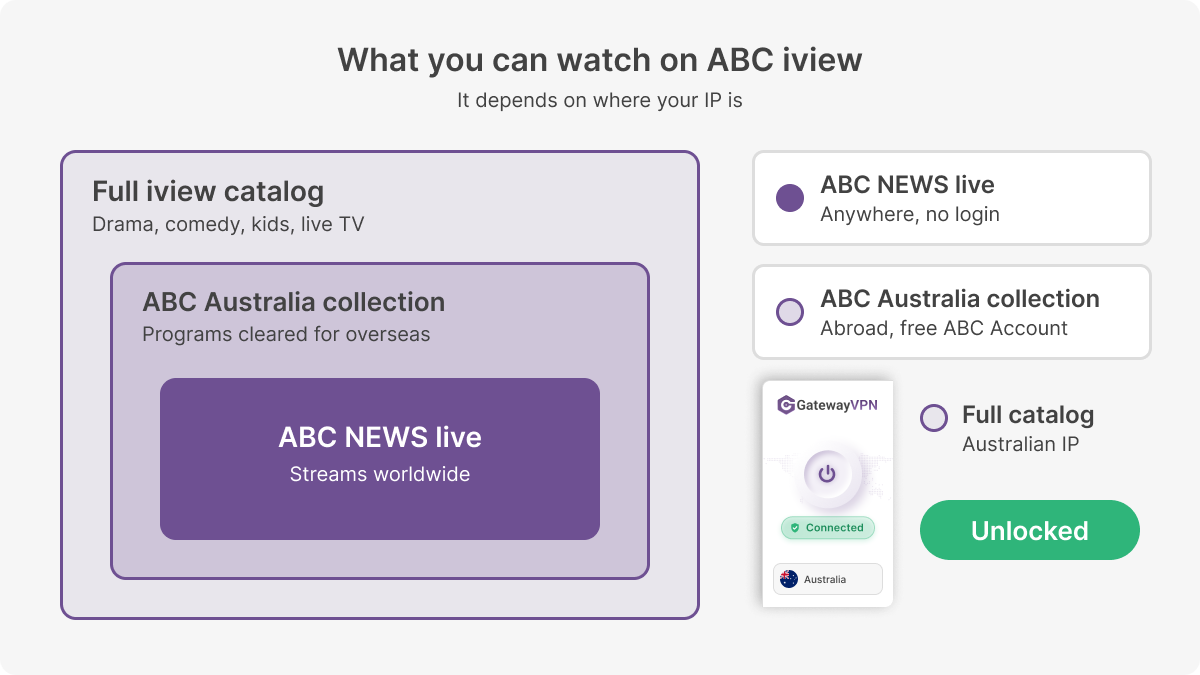 Abroad, you only get ABC NEWS and a small international collection. An Australian IP opens the full catalog.
| What you get | Abroad, no VPN | With an Australian IP |
|---|---|---|
| On-demand library | ABC Australia collection only | Full iview catalog |
| Live channels | ABC NEWS only | All ABC live streams |
| iview app | Not in local app stores | Works if installed from an Australian account |
| ABC Account | Required for on-demand | Required for on-demand |
Want drama, comedy, or kids’ shows? You’ll need the Australian IP. Connect to Australia first, then browse.
Is ABC iview free, and do you need an account?
Yes, it’s free and has no ads. But you need a free ABC Account to watch any on-demand program. ABC’s iview help page confirms both, and notes that live streams and browsing work without logging in.
Some older guides still say you can watch without signing in. That stopped in 2022, when ABC made logins mandatory. Create your account while connected to Australia, so sign-up happens on the same IP you’ll stream from.
| ABC iview at a glance | Details (checked October 2026) |
|---|---|
| Price | Free, no subscription |
| Ads | None |
| Account | Free ABC Account for on-demand programs |
| Catch-up window | Most programs from 30 minutes after broadcast, for at least 30 days |
| Top quality | 720p at 4,500 Kbps |
| Mobile app | Australian App Store (iOS 16+) and Google Play (Android 7.0+) |
One myth worth clearing up: iview doesn’t stream in 4K or 1080p. ABC caps programs at 720p, so a soft picture usually means a slow connection, not a VPN limit.
ABC iview not working with a VPN? How to fix it
Most iview errors with a VPN come from a flagged server, cached location data, or a missing login. Each one has a quick fix.
| Problem | Why it happens | Fix |
|---|---|---|
| “Available in Australia only” error | Your IP is outside Australia, or iview flagged the server | Disconnect and reconnect to a different Australian server |
| Black screen, no playback | The page loaded before the VPN connected | Connect first, then reload iview |
| Still shows your real country | Cookies or cache store your old location | Clear cookies for iview or open a private window |
| Live works, catch-up doesn’t | You’re not logged in to an ABC Account | Log in or create a free account |
| iview app missing from store | The app is only in Australian stores | Use the iview website in your phone’s browser |
| Buffering | A congested server or slow protocol | Switch servers, or try WireGuard in the protocol settings |
Still stuck after all six? Restart the GatewayVPN app and your browser, then connect to Australia before you open anything else.
ABC iview VPN FAQ
Is it legal to use a VPN for ABC iview?
Using a VPN is legal in Australia and most other countries. Streaming from outside Australia may conflict with the ABC iview Terms of Use, so read them first. We’re not lawyers, so treat this as general information.
Can I use a free VPN for ABC iview?
It rarely works. Free VPNs share a small pool of IP addresses among many users, and iview tends to flag those quickly. Many also cap data, which runs out partway through a season.
Can I watch ABC iview in the US, UK, or New Zealand?
Yes, with an Australian IP address. The steps are the same in every country: connect GatewayVPN to Australia, open the iview website, and log in. Without a VPN, you’re limited to the ABC Australia collection and the ABC NEWS stream.
Can I watch ABC iview live TV abroad?
Yes. Once you’re connected to an Australian server, the live channel streams play on the iview website, even before you log in. The ABC NEWS live stream works from anywhere without a VPN.
Will a VPN slow down ABC iview?
Not noticeably. A VPN adds some distance, but iview only needs about 4.5 Mbps for its best 720p stream. If it buffers, try a different Australian server or the WireGuard protocol.
Watch ABC iview on any device with GatewayVPN
The table shows where ABC iview runs and how GatewayVPN gets each device an Australian IP. The left side is ABC’s support; the right side is GatewayVPN’s.
| On ABC iview | With GatewayVPN | ||
|---|---|---|---|
| Device | ABC iview support | GatewayVPN support | Setup guide |
| Windows PC | Web browser | Application | Windows guide |
| Mac | Web browser | Application | macOS guide |
| iPhone and iPad | App (iOS 16+) or web browser | Application | iOS guide |
| Android phones and tablets | App (Android 7.0+) or web browser | Application | Android guide |
| Smart TVs (Samsung, LG, Hisense, Panasonic, FreeviewPlus) | App | Manual setup | Smart TV guide |
| Apple TV (4th generation and later) | App | Manual setup | Apple TV guide |
| Amazon Fire TV Stick | App | Manual setup | Fire TV guide |
| Google TV and Android TV (Sony, NVIDIA Shield) | App | Manual setup | Router guide |
| PlayStation 4 | App | Manual setup | PlayStation guide |
| Xbox One and Xbox Series X|S | App | Manual setup | Xbox guide |
| Amazon Echo Show 10 and 15 | App | Manual setup | Router guide |
| Fetch TV, Foxtel iQ3–iQ5, Hubbl | App | Manual setup | Router guide |
ApplicationInstall the GatewayVPN app on the device and connect to Australia.
Manual setupNo GatewayVPN app on the device; route it through a VPN router or a shared connection.
Source: ABC Help, Where can I get ABC iview? (checked October 2026)
For TVs, consoles, and streaming boxes, set up GatewayVPN on a router with a built-in VPN client, as shown in the router setup guide. Or run the GatewayVPN app on a Windows PC or Mac and share its connection with the device.
Install GatewayVPN on your laptop or phone, connect to an Australian server, and open the iview website before you log in.