
How to unblock SBS On Demand with GatewayVPN
Connect to an Australian server, then sign in to SBS On Demand. The whole setup takes five steps:
- Get GatewayVPN
Choose a plan and install the app from the GatewayVPN downloads page for Windows, macOS, iOS, or Android.
- Connect to Australia
Open GatewayVPN, select Australia in the server list, and connect.
- Open SBS On Demand
Go to sbs.com.au/ondemand in your browser, or open the SBS On Demand app.
- Sign in or create a free account
A new account needs a first name, birth year, gender, email, and a password of at least 5 characters with a number. Click the link in the SBS verification email before you press play.
- Press play
Start a show, a film, or a live channel.
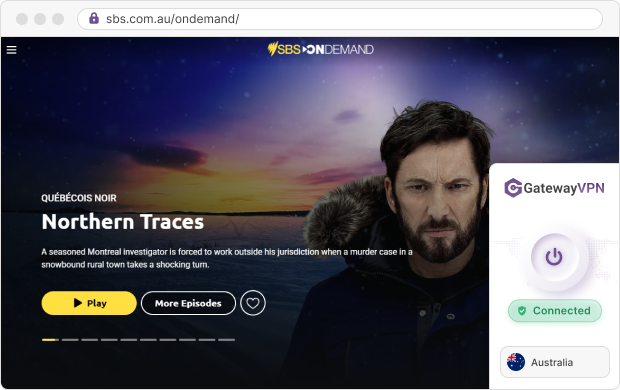
Tip: Connect the VPN before you open SBS On Demand. If the site loaded first, clear its cookies and reload the page so it picks up your Australian connection.
On iPhone and Android, the ping indicator in GatewayVPN’s server menu shows how fast each server responds from where you are. Pick the Australian server with the lowest number for smoother live streams.
Why use GatewayVPN as your VPN for SBS On Demand?
A VPN for SBS On Demand has one job: hold a stable Australian IP for as long as you watch. These GatewayVPN features help with exactly that.
- No bandwidth limits
Stream a full season or a three-hour live broadcast without a data cap slowing you down.
- Kill switch
A kill switch cuts your internet if the VPN drops, so SBS never sees your real IP mid-episode. It’s on Windows, macOS, and Android.
- Split tunneling
Split tunneling sends SBS On Demand through Australia while your banking and maps apps keep your local connection. It’s on Windows, macOS, and Android.
- Fallback protocols
A protocol is the set of rules the VPN uses to build its tunnel. If hotel Wi-Fi blocks one, the app can switch to a fallback, e.g. from WireGuard to OpenVPN TCP.
- 5 devices at once
Watch on your laptop while your partner streams on a phone, all on one account.
- Try it first
Every plan has a 30-day money-back guarantee, and the iOS and Android apps include a 7-day free trial.
The 12-month plan works out to $4.99 a month ($59.88 billed yearly). That covers every device you’ll use to watch SBS from abroad.
Start with the device you’ll watch on most. Install the app, connect to Australia, and test a live channel before you travel.
Get GatewayVPNWhy can’t you watch SBS On Demand outside Australia?
Content rights. SBS’s rights agreements limit streaming to Australia, and that applies to Australian citizens overseas too.
SBS works out your location from your IP address, the number that identifies your internet connection. An overseas IP gets the error “This video is only available in Australia”.
So your account doesn’t help on its own. Any IP address outside Australia gets blocked, whoever signs in, and an Australian server is what changes the result.
Is SBS On Demand free to watch abroad?
Yes. SBS On Demand is a 100% free streaming service, so there’s no subscription and no Australian card to add. Here’s everything you need to watch SBS On Demand abroad:
| What you need | Cost | Details |
|---|---|---|
| SBS On Demand account | Free | First name, birth year, gender, email, and password |
| Payment method | Not needed | No paid plans to choose |
| Australian IP address | Your GatewayVPN plan | Connect to a server in Australia |
| Supported device | Your own | Browser, phone, smart TV, or streaming stick (see the table at the end) |
Cost and account requirements checked on the SBS Help Centre in October 2026.
What can you watch on SBS On Demand from abroad?
SBS lists more than 15,000 hours of dramas, documentaries, comedies, films, sport, news, and live TV. It also carries online-exclusive series and films that don’t air on broadcast TV.
The live section streams SBS’s TV channels: SBS, SBS Viceland, SBS World Movies, SBS Food, NITV, and WorldWatch. One Australian connection unlocks both the catch-up library and these channels.
How to watch SBS live TV outside Australia
Open the Live TV hub while GatewayVPN is connected to Australia. It shows what’s on now, plus start and end times for what’s next.
Every time in that guide is Sydney time, because the live stream follows the New South Wales broadcast. Sydney runs on AEST (UTC+10), or AEDT (UTC+11) from early October to early April.
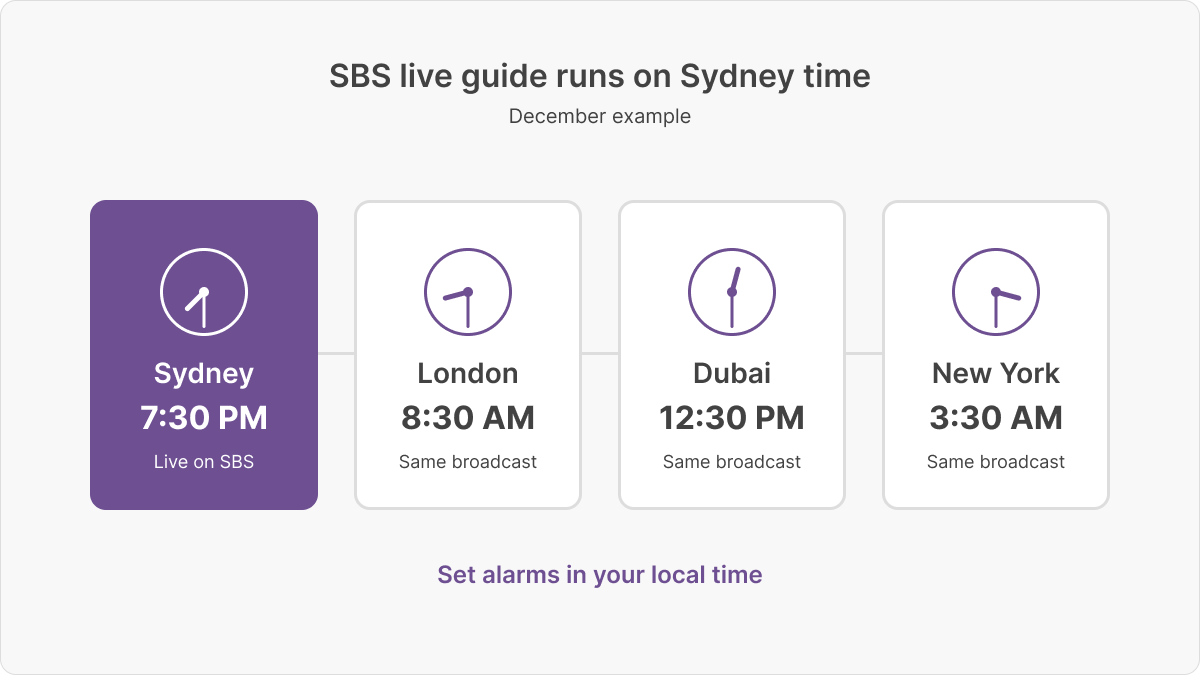
For live sport, set your alarm in local time, not Sydney time. Then connect to Australia 10 minutes before the start so the stream has time to load.
SBS On Demand not working with a VPN? How to fix it
Most errors mean SBS still sees a location outside Australia. Work through these fixes in order:
| Problem | Why it happens | Fix |
|---|---|---|
| “This video is only available in Australia” | SBS sees a non-Australian IP, or the page loaded before the VPN connected | Check GatewayVPN shows Australia, clear SBS cookies, and reload |
| Video buffers or won’t start | The server you picked is busy or far from you | Switch to another Australian server with a lower ping |
| Stream stops after a network change | The VPN dropped and your real IP showed for a moment | Turn on the kill switch (Windows, macOS, Android) or Reconnect automatically (iOS, Android) |
| VPN won’t connect on hotel or office Wi-Fi | The network blocks your current protocol | Let the app use a fallback protocol, or pick OpenVPN TCP manually |
| No verification email | It went to spam, or the address has a typo | Check spam and junk folders, then confirm the address |
| SBS app missing or outdated on your TV | SBS no longer supports Panasonic, Sony Linux, and pre-2017 Samsung TVs | Cast with Chromecast from your phone or browser, or plug in a laptop by HDMI |
Still stuck? The GatewayVPN support center walks through each app setting step by step.
Frequently asked questions about watching SBS On Demand abroad
Can I watch SBS On Demand outside Australia without a VPN?
No. SBS On Demand only streams within Australia, and SBS says that includes Australian citizens overseas. You need an Australian IP address, which a VPN for SBS On Demand gives you.
Can I download SBS On Demand shows before I travel?
No. SBS On Demand is streaming-only, and offline downloads aren’t possible or permitted. To keep watching on a trip, stream through an Australian connection.
Do I need an Australian phone number or credit card to sign up?
No. A free account asks only for a first name, birth year, gender, email, and password. Connect GatewayVPN to Australia first, then create the account from wherever you are.
Can I use a free VPN to watch SBS On Demand?
We don’t recommend it. Free VPNs usually cap data and crowd many users onto a few servers, which means buffering on long streams. A live match or a full season needs unlimited bandwidth.
Is it legal to watch SBS On Demand with a VPN?
VPNs are legal in most countries, but some restrict them, so check the rules where you’re staying. Separately, the SBS Help Centre says SBS On Demand doesn’t support VPN access. That’s a question of SBS’s terms, not of the law in most places.
Can I watch SBS On Demand on Roku, PlayStation, or Xbox?
Not officially. Some guides still list these devices, but none appear on SBS’s supported-devices list as of October 2026. Use Chromecast, a supported smart TV, or a laptop connected by HDMI instead.
Watch SBS On Demand on any device with GatewayVPN
The table shows where SBS On Demand runs and how GatewayVPN works on each device. Rows marked Application connect directly; the rest use manual setup.
| On SBS On Demand | With GatewayVPN | ||
|---|---|---|---|
| Device | SBS On Demand support | GatewayVPN support | Setup guide |
| Windows PC | Web browser | Application | Windows guide |
| Mac | Web browser | Application | macOS guide |
| iPhone and iPad (iOS 17+) | App | Application | iOS guide |
| Android phones and tablets (8.0+) | App | Application | Android guide |
| Samsung and LG TVs (2017+) | App | Manual setup | Smart TV guide |
| Hisense TVs (2021+) | App | Manual setup | Smart TV guide (see above) |
| Android and Google TVs (Android 9+) | App | Manual setup | Smart TV guide (see above) |
| Amazon Fire TV Stick (Fire OS 5+) | App | Manual setup | Fire TV guide |
| Apple TV (4th gen+) | App | Manual setup | Apple TV guide |
| Chromecast (2nd and 3rd gen, Ultra, with Google TV) | App | Manual setup | Chromecast guide |
| Fetch, Foxtel iQ, and Hubbl boxes | App | Manual setup | Router guide |
Application GatewayVPN has a native app for this device, or you watch in a browser on a PC or Mac running the app.
Manual setup No GatewayVPN app on this device, so you connect it through a VPN router or a shared PC or Mac connection.
Source: SBS Help Centre supported-devices list, checked October 2026.
Manual setup means GatewayVPN runs on a router with a built-in VPN client, or on a Windows PC or Mac that shares its connection with your TV. The router guide in the last row covers a whole-home setup, so every TV and stick connects through Australia.
Install GatewayVPN on the device you watch most, connect to Australia, and open SBS On Demand before your next show starts.