
The Wi-Fi name is “AIRPORT_FREE_WIFI_2.” No password. No questions. Just that little loading wheel and the tiny rush of relief—because your flight’s delayed, you’ve got three emails to fire off, and your phone is hanging on to 12% like it’s a personal vendetta.
So you connect.
And honestly? That’s how most privacy problems start. Not with spy-movie hackers and green code raining down a screen, but with normal life: a hotel lobby, a crowded café, a coworking space where everyone’s “heads down” and the network is shared by a hundred strangers you’ll never meet.
Here’s the simple truth: a VPN isn’t magic, but it does close some common privacy and security holes. It’s not going to make you invisible. It won’t stop you from clicking a sketchy link at 1 a.m. (we’ve all been there). But it can make your connection harder to snoop on and your online footprint a little less… exposed.
So—why use a VPN in the first place? In the next few minutes, we’ll break down what a VPN actually does (in plain English), what it’s used for day-to-day, the real benefits for privacy and security, and the honest question everyone asks eventually: is it worth it, or just another app you’ll forget you installed?
What Does a VPN Do?
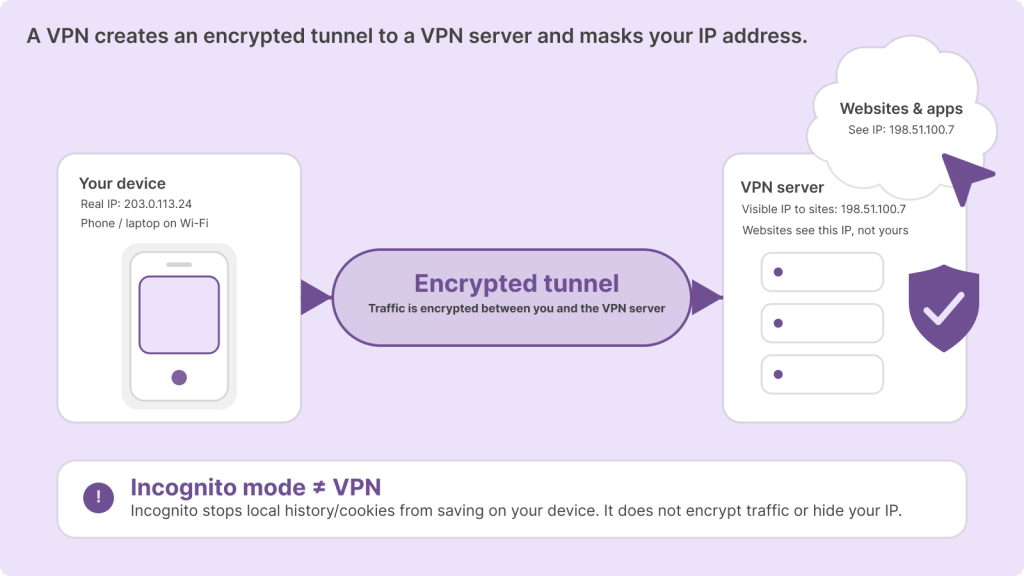
A VPN (Virtual Private Network) creates an encrypted tunnel between your device and a VPN server, and it hides or changes your IP address while you’re online.
So what actually changes when you flip it on?
First, your internet traffic is encrypted as it travels from your phone/laptop to the VPN server. That matters most on sketchy or shared networks (airports, hotels, cafés), because it makes your data a lot harder to intercept or snoop on in transit.
Second, websites and apps see the VPN server’s IP address, not your real one. Instead of your connection looking like it’s coming from you at your location, it looks like it’s coming from the VPN server. That’s one of the big practical answers to “what does a VPN do?”—it adds a layer between you and the wider internet.
And just to clear up a super common mix-up: incognito mode isn’t a VPN. Incognito mostly stops your browser from saving local history and cookies on your device. It doesn’t encrypt your connection, and it doesn’t hide your IP from websites, your ISP, or the network you’re using. Different tool. Different job.
What Is a VPN Used For?
Once you understand the “tunnel + IP change” thing, the next question is the one people actually care about: what is a VPN used for in real life? Not theory. Not tech-speak. Real Tuesday afternoon stuff.
Most use cases fall into three big buckets:
1) Privacy (less tracking, less exposure)
A VPN can make it harder for random networks and casual snoops to see what you’re doing, and it can reduce how much of your browsing is tied directly to your personal IP address. It doesn’t erase your identity from the internet, but it does shrink the amount of easy-to-grab information floating around.
2) Security (especially on public Wi-Fi)
Public networks are convenient and, let’s be honest, a little lawless. A VPN helps protect your connection by encrypting your traffic between your device and the VPN server—extra valuable when you’re logging into accounts, sending messages, or doing anything sensitive on a network you don’t control.
3) Access and consistency while traveling
Travel turns the internet into a moving target. A VPN can help you connect more safely on hotel or airport Wi-Fi and keep your online experience more consistent when you’re bouncing between networks and locations.
One quick reality check, though: a VPN isn’t an antivirus, and it’s definitely not a cloak of invisibility. It won’t stop malware if you download the wrong thing, and it won’t make bad online habits “safe.” What it does do is give you a stronger, more private connection—especially when the network itself can’t be trusted.
Benefits of a VPN (Privacy + Security, Explained in Plain English)
People talk about VPNs like they’re either a lifesaver or a scam. The reality—annoyingly—is in the middle. The benefits of a VPN are real, but they’re specific. You get the most value when you’re using networks you don’t fully trust (which, these days, is… a lot of them).
VPN Benefits for Privacy
Let’s start with the privacy side, because that’s usually the “why” behind the download.
Masking your IP address (what that means in real life).
Your IP address is basically a rough “return address” for your internet connection. It can hint at your location and it’s one of the many breadcrumbs that can be used to connect activity back to you. With a VPN on, websites and apps see the VPN server’s IP instead of yours. Practically? You’re harder to profile based on your direct connection, and you’re not handing over your “home base” IP every time you open a site.
Reducing ISP-level visibility.
Your internet provider still knows you’re using the internet (obviously), and they’ll still see that you’re connected to a VPN server. But because your traffic is encrypted between you and that server, they can generally see less of what you’re doing—especially the content of what you’re accessing. It’s not a magical “ISP can’t see anything” button, but it does shrink their window into your activity.
Making tracking harder across sessions and locations (not impossible).
A VPN can disrupt some forms of tracking by changing the IP address sites see and by keeping you from looking like the exact same connection every time. That said—important—tracking can still happen through cookies, logins, fingerprinting, and the usual internet tricks. So yes: harder. No: not impossible.
A few moments where these VPN benefits for privacy really show up:
- Browsing on shared networks (coworking spaces, hotels, campuses) where you don’t know who else is “on” the same network.
- Researching sensitive topics where you’d rather not have your connection so easily tied to you.
- Avoiding profiling on sketchy Wi-Fi—the kind that feels like it was set up in 2009 and never updated since.
VPN Benefits for Security
Now the security angle, which is less dramatic than Hollywood makes it—but more relevant than people assume.
Encryption on public Wi-Fi.
Public Wi-Fi is convenient, but it’s also shared, and shared networks are where snooping gets easier. Without encryption, someone on the same network can sometimes “listen in” on traffic (sniffing) or try to insert themselves between you and the site you’re visiting (a man-in-the-middle attack). When your VPN is on, your traffic is encrypted on the way to the VPN server, which makes those interception attempts a lot less useful.
Protecting logins and data in transit.
Even if most modern sites use HTTPS (good!), a VPN still adds protection on untrusted networks by encrypting your connection end-to-end to the VPN server. That’s especially comforting when you’re logging into email, work tools, banking apps, or anything you’d rather not gamble with on “CafeGuestWiFi.”
An extra layer against common interception attacks.
Think of it like locking the door and closing the curtains. Neither is perfect on its own, but together they reduce the easy wins for opportunistic attackers on the network.
One more thing to keep in mind: if you’re shopping for a VPN, look for a kill switch. It’s a simple feature that cuts your internet connection if the VPN drops unexpectedly—so you don’t quietly switch back to an unprotected connection without noticing.
That’s the core of it: VPN benefits for security aren’t about invincibility. They’re about reducing risk in the places people usually get sloppy—public networks, rushed logins, travel days, and those “I’ll just connect for a second” moments.
Reasons to Use a VPN in Everyday Life
If you’re still wondering whether a VPN is “for you,” don’t overthink it. The best way to answer it is to look at your normal week. Because the most convincing reasons to use a VPN aren’t dramatic—they’re boring, repetitive, everyday.
Public Wi-Fi (cafés, airports, hotels, universities).
This is the classic. You’re on a network you don’t control, surrounded by people you don’t know, and the Wi-Fi password is either posted on a wall or not required at all. A VPN adds a protective layer by encrypting your traffic to the VPN server, which is especially useful when you’re logging into email, messaging apps, or anything involving accounts and passwords.
Travel (safer connections + fewer “region” headaches).
Travel is basically “public Wi-Fi roulette.” Hotels, airports, rental apartments, conference venues—new network after new network. A VPN helps you connect more safely in those situations, and it can also reduce those annoying moments where a service behaves differently depending on where you are (yes, sometimes that includes content availability changing by region). The key word here is reduce—it’s not guaranteed, but it can help.
Remote work (work tools, sensitive logins, mixed networks).
Working from home sounds safe until you remember you’re still connecting to all sorts of networks: home internet, coworking Wi-Fi, client offices, mobile hotspots. A VPN can help protect access to work tools and keep your connection more private when you’re bouncing around. It’s also a tidy way to separate “work mode” from whatever else your network is doing—smart devices, roommates streaming, etc.
Shopping and finance (extra protection on unfamiliar networks).
Would I recommend doing online banking on a random café network without protection? Not really. A VPN doesn’t guarantee safety—nothing does—but it can reduce the risk of interception on untrusted networks by encrypting the connection between you and the VPN server. Think of it as lowering the odds, not eliminating them.
Home privacy (and the ISP visibility piece).
At home, the value is more privacy-focused. With a VPN on, your ISP can typically see that you’re connected to a VPN server, but they’ll generally see less of the content of what you’re doing inside that encrypted tunnel. Caveat: most websites already use HTTPS, which encrypts content in transit anyway—so a VPN at home isn’t always a night-and-day difference. Still, it can add a layer and reduce how directly your browsing ties back to your home connection.
That’s the real pitch, honestly: the strongest reasons to use a VPN show up when you’re on networks you don’t fully trust… and when you’d rather keep your online life just a little less exposed.
Advantages of Using a VPN (Quick Summary)
The advantages of using a VPN are pretty straightforward when you strip away the hype: it encrypts your connection, masks your IP address, and makes everyday internet life—especially on public Wi-Fi—a lot less risky. It’s also genuinely handy when you travel, because it helps you connect more safely on unfamiliar networks and can smooth out those “why is this site behaving differently here?” moments.
But let’s keep it honest: a VPN won’t save you from everything. It doesn’t stop phishing, it doesn’t make you anonymous (cookies, logins, fingerprinting still exist), and it doesn’t replace basic hygiene like strong passwords and two-factor authentication. Think of it as one solid layer in your privacy-and-security stack—not the whole stack, not a magic shield, just a smart upgrade you’ll be glad you had the next time you’re stuck on “AIRPORT_FREE_WIFI_2.”
Do I Need a VPN? Here’s a Simple Way to Decide
Let’s cut through the noise. Do I need a VPN? Probably—if your life includes any of the modern classics below.
If you answer yes to even one of these, you’ll likely get real value from using a VPN:
You hop on public Wi-Fi at least once a week (cafés, airports, hotels, campus networks).
You travel often, even if it’s just “work trips + family visits.”
You work remotely and log into work tools from different networks.
You care about privacy and don’t love the feeling of being quietly profiled and tracked everywhere you click.
You live with roommates or use shared networks where you’re not the only person connected (and you’re not always the “network admin,” let’s be real).
Now, if none of that sounds like you—no public Wi-Fi, no travel, you mostly browse at home on a trusted connection, and you’re already using strong passwords + 2FA—then you might not need a VPN running 24/7. Still, even in that case, it can be a smart “situational tool”: turn it on for travel days, shared networks, or anything you’d rather keep a little more private. The goal isn’t to be paranoid. It’s to be practical.
Is a VPN Worth It?
So, is a VPN worth it? The annoying-but-true answer is: it depends on how you use the internet. The more you rely on public networks (or bounce between networks), the more a VPN stops being “extra” and starts feeling like… basic gear.
Here’s what you’re actually paying for with a legit VPN service, in plain terms: server infrastructure (a lot of it, in multiple locations), speed and reliability (so the VPN doesn’t feel like dragging your internet through wet sand), a stronger privacy posture (clear policies, sensible defaults, fewer creepy surprises), and support for when something breaks at the worst possible time—like five minutes before a Zoom call.
Free vs. paid: the short truth
Free VPNs aren’t automatically evil, but the tradeoffs are usually loud: slower speeds, limited server locations, annoying ads, and (sometimes) data practices that are… let’s say “not privacy-forward.” If a service costs money to run and it’s free forever, you should at least ask, okay—so who’s paying, really? Sometimes the answer is “you,” just not with a credit card.
Paid VPNs tend to be smoother: better performance, more locations, and clearer accountability—because you’re the customer, not the product.
Who gets the most value?
If you’re a traveler, a frequent public Wi-Fi user, or you work remotely, a VPN is usually worth it. Those are the people who run into the exact situations VPNs were made for: untrusted networks, constant logins, and lots of moving parts.
Who may not (or may not need it all the time)
If you’re mostly a home-only user on a trusted network, the difference can feel less dramatic day-to-day—especially if your browsing is already covered by HTTPS and you’re good about passwords and 2FA. A VPN can still add privacy and an extra layer, but it may be more of an “insurance policy” than a daily must-have.
In other words, if your internet life happens out in the wild, a VPN is often worth it. If your internet life is mostly couch + home Wi-Fi, it might still be worth it… just not as urgently.
What to Look for in a VPN (and How GatewayVPN Checks the Right Boxes)
A VPN is only as useful as the protections it reliably delivers. So instead of getting dazzled by marketing fluff (“military-grade” this, “ultra-secure” that), here’s the short checklist that actually matters—plus where GatewayVPN fits in.
Start with the protocol: WireGuard (and others)
If a VPN is a car, the protocol is the engine. And you don’t need to be a mechanic to know you want something modern, well-regarded, and built for today’s internet—not 2012’s.
Look for widely trusted protocols, because that’s where security and speed meet in the real world. GatewayVPN supports WireGuard (alongside other protocols), which is a solid sign you’re getting up-to-date encryption without unnecessary sluggishness.
Always-on matters more than people think
A VPN that’s only on sometimes is like a seatbelt you remember… occasionally. Great in theory. Useless the moment you forget.
With an Always-on feature, GatewayVPN helps keep protection running by default—especially on phones, travel days, and those “I’ll just connect for five minutes” public Wi-Fi moments that somehow turn into an hour.
Leak protection keeps your privacy from springing a surprise
Even good VPNs can fail the “small details” test if leaks happen. This is the quiet deal-breaker: you think you’re protected, but a DNS request slips out, or your real IP peeks through at the worst time. Not dramatic. Just… annoying and avoidable.
GatewayVPN includes leak protection, which helps prevent accidental exposure of things like DNS requests or your real IP address. It’s one of those features you don’t think about—until you really, really need it.
Split tunneling lets you choose what goes through the VPN
Not everything needs the VPN all the time. Some traffic benefits a lot—browsing, banking, work logins, basically anything you’d hate to have intercepted. Other traffic? It might be fine outside the tunnel, especially if you’re trying to use local devices (printers, smart TVs) or certain apps that don’t play nicely with VPN routing.
That’s where split tunneling is clutch. GatewayVPN offers split tunneling, so you can route the sensitive stuff through the VPN while keeping the rest simple and fast. Control without turning your internet into a puzzle.
No-logs policy—good, but ask the next question
If privacy is one of your main reasons to use a VPN, a no-logs policy isn’t a fancy bonus. It’s table stakes.
GatewayVPN states a no-logs policy, which is a positive. The practical follow-up, though, is the one people skip: how is that claim supported over time?
Worth knowing (and there’s no need to be weird about it): GatewayVPN is new and hasn’t completed third-party audits yet. So the sensible approach is to take the policy at face value and keep an eye on transparency—clear documentation, consistent behavior, and a track record that gets stronger as the company matures.
VPN FAQ
What does a VPN do on my phone?
It encrypts your phone’s internet connection and routes it through a VPN server, so apps and websites see the server’s IP instead of your phone’s real one. This is especially useful when you’re on public Wi-Fi or hopping between networks all day.
Will a VPN slow down my internet?
Sometimes, yes—because your traffic is taking an extra hop and being encrypted. A good VPN with nearby servers and modern protocols (like WireGuard) can keep the slowdown small enough that you barely notice it for everyday browsing.
Should I leave my VPN on all the time?
If you use public Wi-Fi a lot, travel often, or just don’t want to think about it, leaving it on is the simplest move. Some people prefer “situational use” (turn it on for cafés, airports, and work logins) because a few apps or local devices can behave oddly with a VPN.
Does a VPN hide me from my ISP?
It usually hides the content of what you’re doing by encrypting traffic between you and the VPN server, so your ISP can see less detail. But your ISP can still see that you’re using a VPN and will still know you’re online.
Is a VPN legal?
In many countries, yes—VPNs are legal and commonly used for privacy and security. That said, laws vary by location, so if you’re traveling or living somewhere with internet restrictions, it’s smart to check local rules.


 By Nolan A. Pierce
 By Diego Castillo