

There’s something slightly annoying about finding the Spanish show, match, news segment, or late-night RTVE clip you want to watch… only to have it refuse to play the moment you’re outside Spain. Very helpful. Thanks, internet.
RTVE Play is Spain’s public streaming platform, bringing together live and on-demand content from RTVE channels like La 1, La 2, Teledeporte, Playz, and Canal 24 Horas. You’ll find Spanish TV shows, news, sports, documentaries, movies, live broadcasts, and the sort of local programming that just doesn’t feel the same when you’re digging through random clips elsewhere.
The catch? Some RTVE content may not be available outside Spain. Because of regional restrictions and licensing rules, RTVE can check your location through your IP address and limit access when you’re abroad.
So, if you want to watch RTVE abroad, the simplest route is to connect to a Spain VPN server before opening RTVE Play. A VPN for RTVE can give your device a Spanish IP address, helping RTVE see your connection as coming from Spain instead of wherever you actually are. Handy little workaround, that.
Can You Watch RTVE Outside Spain?
Yes, you can open RTVE Play outside Spain in many cases. It’s not as if the whole website vanishes the second you cross the border. But — and there’s always a but with streaming — not every piece of content is available everywhere.
Some RTVE shows, live channels, sports broadcasts, movies, or on-demand titles may only be available to viewers in Spain. So you might be able to browse RTVE Play from abroad, click around, maybe even watch certain clips, and then suddenly hit a wall when you choose the one thing you actually wanted. Classic.
Is RTVE available abroad?
RTVE Play may be accessible internationally, depending on where you are and what you’re trying to watch. The platform itself can load outside Spain, and some content may play normally.
However, certain RTVE content is restricted to Spain. This is especially common with live TV, sporting events, movies, and shows where broadcast rights are tied to a specific region. In plain English: RTVE may have permission to show that content in Spain, but not necessarily in France, the UK, the US, or wherever you happen to be unpacking your suitcase.

That’s why watching RTVE outside Spain can feel a bit inconsistent. One title works. Another doesn’t. A live stream opens today, then refuses tomorrow. Annoying? Definitely. Unusual? Not really.
Why is some RTVE content blocked outside Spain?
Most of the time, it comes down to regional licensing and location-based restrictions. Broadcasters don’t always own worldwide rights for every show, match, film, or live event they stream. Instead, rights are often divided by country, and Spain gets one set of permissions while the rest of the world gets a polite little “not available” message.
RTVE can check your location by looking at your IP address. Your IP address tells websites roughly where your internet connection is coming from. If that address points to Spain, RTVE may treat you as a viewer in Spain. If it points somewhere else, some content may not play.
That’s where using a VPN for RTVE comes in. By connecting to a Spain VPN server first, you can make your connection appear as if it’s coming from Spain, which may help you watch RTVE abroad with fewer regional hiccups.
How to Watch RTVE Abroad with a VPN
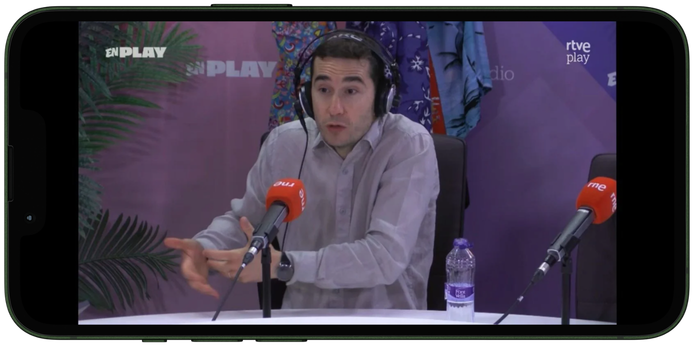
The whole thing is pretty simple once you know the order. And the order matters a bit here — connect to the VPN first, then open RTVE Play. Not the other way around, because streaming apps can be oddly stubborn about remembering where you were five minutes ago.
Here’s the quick version:
- Sign up for a GatewayVPN account.
- Connect to a Spain VPN server.
- Open RTVE Play.
- Sign in or create an account if needed.
- Start watching RTVE abroad.
That’s it. No mysterious tech ritual. No typing IP addresses into a black screen like you’re in a 90s hacker movie.
Step 1: Download GatewayVPN
First, download GatewayVPN on the device you want to use for RTVE Play.
GatewayVPN is available on major devices, including phones, tablets, and desktop computers, so you can set it up whether you’re watching from the sofa, a hotel room, an airport lounge, or — let’s be honest — half-asleep in bed with your phone two inches from your face.
Install the app before opening RTVE Play. This gives you a cleaner start, because your device can connect through Spain before RTVE checks where your connection is coming from.
Step 2: Connect to a Spain VPN Server
Once GatewayVPN is installed, open the app and choose a server in Spain.
That’s the key part. A VPN for RTVE works by routing your internet connection through a Spanish server, which gives your device a Spanish IP address. To RTVE, that can make your connection look like it’s coming from Spain rather than from abroad.
Simple version: open GatewayVPN, choose Spain, and connect.
Give it a moment to settle. A few seconds, usually. Then you’re ready to move on.
Step 3: Open RTVE Play
After you’re connected to the Spain VPN server, open RTVE Play.
You can use the RTVE Play website in your browser or open the RTVE Play app on your phone, tablet, or supported device. RTVE Play includes live and on-demand content from channels such as La 1, La 2, Teledeporte, Playz, and Canal 24 Horas, along with Spanish shows, news, sports, documentaries, movies, and live broadcasts.
Some content may play right away. Other content may ask you to sign in first. Streaming platforms love making things just slightly less straightforward than they need to be, don’t they?
Step 4: Sign In or Create an RTVE Account
If RTVE asks you to sign in, use your existing account or create a new one.
Not every piece of content will necessarily require an account, and requirements can vary depending on what you’re trying to watch, which device you’re using, and sometimes the platform’s own rules at that moment. So don’t be surprised if one video opens instantly while another asks for login details.
It’s best to stay connected to the same Spain VPN server before signing in. That way, RTVE sees a consistent location from the start instead of getting mixed signals. Mixed signals are bad in dating, and apparently also in streaming.
Step 5: Start Streaming RTVE Abroad
Once you’re connected to Spain and RTVE Play is open, choose what you want to watch.
You can try RTVE live channels, Spanish shows, documentaries, news programs, sports coverage, films, and on-demand titles. If everything loads properly, lovely. You’re done.
If the video does not play, don’t disconnect the VPN right away. Keep GatewayVPN connected to the Spain server and try the troubleshooting steps below. Sometimes it’s just a server switch, a cookie issue, or the app needing a proper restart — annoying little gremlins, basically.
How to Watch RTVE Abroad on Different Devices
The basic idea stays the same on every device: connect to Spain first, then open RTVE Play. Simple enough. The little differences come from the device you’re using, because phones, laptops, smart TVs, and streaming sticks all like to make their own tiny drama out of VPN setup.
Watch RTVE Abroad on iPhone or iPad
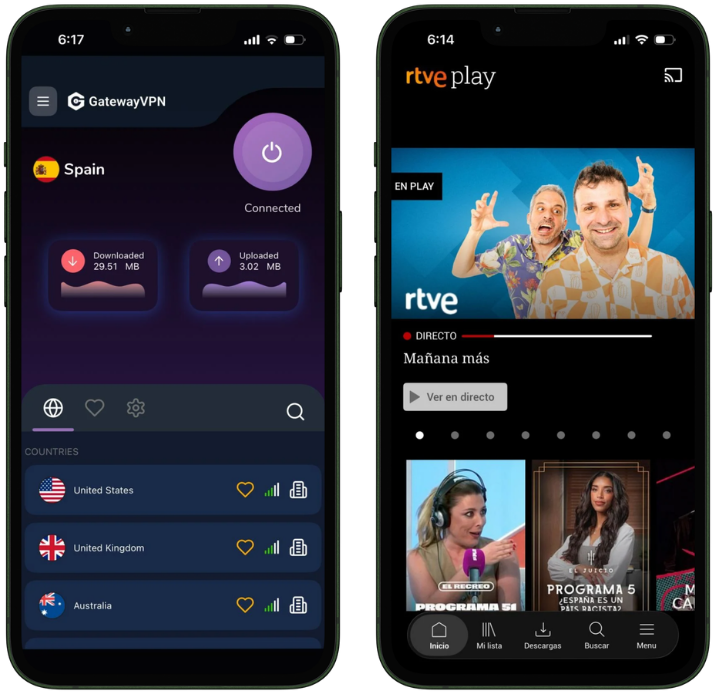
If you’re watching on an iPhone or iPad, start by downloading GatewayVPN from the App Store.
Once it’s installed, open GatewayVPN and connect to a Spain server. After the VPN connection is active, open the RTVE Play app or visit RTVE Play in your browser. Sign in if RTVE asks you to, choose your show, channel, match, or news program, and start streaming.
That’s the nice thing about mobile. Usually, it’s the least fussy option.
Watch RTVE Abroad on Android
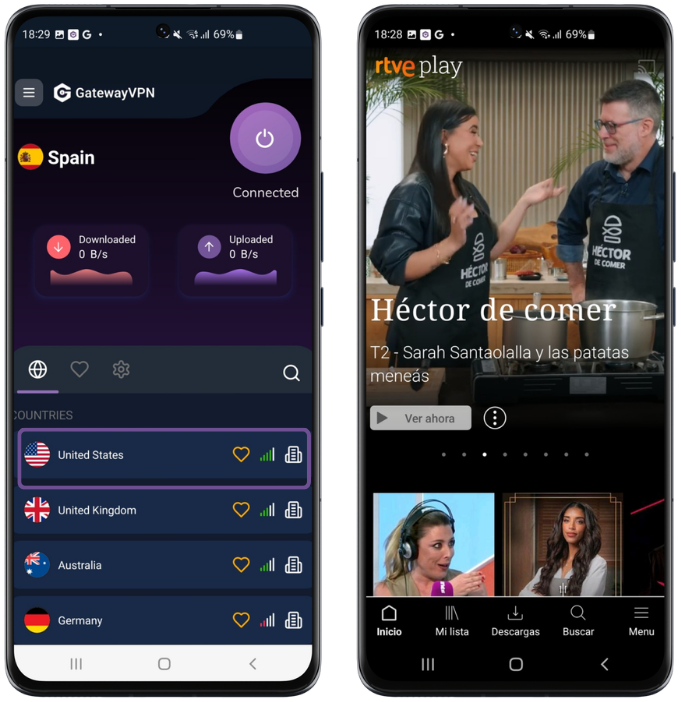
On Android, the process is just as straightforward.
Download GatewayVPN from Google Play, open the app, and connect to a Spain VPN server. Once your connection is active, open RTVE Play on your Android phone or tablet. Sign in or create an account if needed, then start watching RTVE abroad.
If RTVE was already open before you connected to the VPN, close it completely and reopen it. Android apps can cling to old location data like it’s a treasured family heirloom.
Watch RTVE Abroad on Windows or Mac
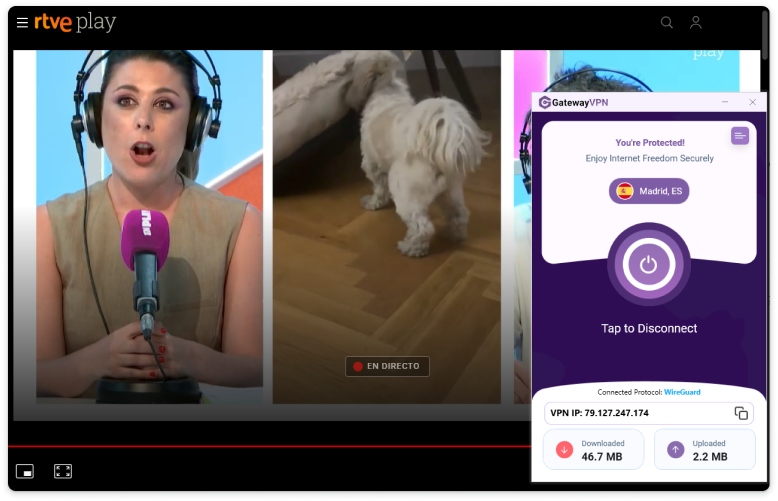
For Windows or Mac, download GatewayVPN for desktop and install it on your computer.
Open GatewayVPN, connect to Spain, then visit RTVE Play in your browser. From there, choose the live channel, documentary, show, movie, or sports broadcast you want to watch.
This is often the cleanest setup if you prefer watching on a bigger screen without dealing with smart TV limitations. Laptop, HDMI cable, done. Not glamorous, but it works.
Watch RTVE Abroad on Smart TV, Apple TV, or Fire TV Stick
Watching RTVE abroad on a smart TV, Apple TV, or Fire TV Stick can be a little more fiddly. Not impossible. Just fiddly.
Some TV devices do not support every VPN app directly, so you may need to set up the VPN connection in a slightly different way. The best option depends on your device and how your home network is set up.
You can:
- Set up GatewayVPN on your router, so your TV connects through the VPN automatically.
- Share a VPN connection from your Windows PC or Mac.
- Use a mobile hotspot from a VPN-connected phone, if your device and mobile plan support it.
For full setup instructions, use these guides:
- How to set up GatewayVPN on your router
- How to set up GatewayVPN on smart TVs
- How to set up GatewayVPN on Apple TV
- How To Set Up GatewayVPN on Amazon Fire TV
Once your TV device is connected through a Spain VPN server, open RTVE Play and try streaming again. If it still acts stubborn, don’t panic yet — the troubleshooting section below should help.
Why You Need a VPN for RTVE Outside Spain
RTVE may use your IP address to check where you’re connecting from. If your IP address is outside Spain, some live channels, sports, shows, movies, or on-demand titles may not play.
A VPN for RTVE routes your connection through a Spain server. This gives your device a Spanish IP address, helping RTVE see your connection as coming from Spain while you’re abroad.
A VPN also encrypts your connection, which is useful when streaming on hotel, airport, or public Wi-Fi. So you get two benefits: easier access to RTVE outside Spain and better connection security.
What to Look for in a VPN for RTVE
Not every VPN is a good fit for streaming RTVE. Some are slow, some have weak server options, and some work beautifully right until you actually need them. Typical.
Here’s what matters most.
Spain VPN servers
To watch RTVE abroad, you need a VPN with reliable servers in Spain. This is what gives your device a Spanish IP address and helps RTVE see your connection as coming from inside Spain.
Fast streaming speeds
Speed matters, especially for live TV, sports, and HD playback. A slow VPN can turn a simple RTVE stream into buffering purgatory, and nobody wants to watch a football match three frozen pixels at a time.
Apps for your devices
Choose a VPN that works on the devices you actually use. At minimum, look for support for iPhone, Android, Windows, and Mac. Router support is also useful if you want to watch RTVE on a smart TV, Apple TV, or Fire TV Stick.
Strong privacy and encryption
A good VPN should also protect your connection, not just change your location. Strong encryption is especially useful when watching RTVE on hotel Wi-Fi, airport Wi-Fi, or any public network that feels a bit… suspicious.
Reliable support
Sometimes a specific server may not work right away. That happens. Reliable support can help you find the best Spain server for RTVE instead of leaving you to click around and hope for the best.
RTVE Not Working with VPN? Try These Fixes
If RTVE is still not working with your VPN, don’t assume the whole setup is broken. Sometimes it’s just one stubborn server, old browser data, or the app being dramatic for no good reason.
Try these fixes first.
Switch to another Spain server
The Spain server you’re using may be overloaded or detected by RTVE. Disconnect from the current server, choose another Spain server in GatewayVPN, and open RTVE Play again.
Small change. Often does the job.
Clear browser cookies and cache
Your browser may still have old location data saved from before you connected to the VPN. Clear your cookies and cache, then reconnect to the Spain server and reload RTVE Play.
This is especially useful if RTVE worked once and then suddenly decided, nope.
Restart the RTVE app or browser
Close RTVE completely. Not just minimize it — fully close it.
Then reconnect to GatewayVPN, make sure you’re still on a Spain server, and reopen RTVE Play. Apps can hang onto old connection details, so a clean restart helps.
Check for IP or DNS leaks
If your real location is leaking outside the VPN tunnel, RTVE may still detect that you’re outside Spain. Run an IP or DNS leak test while connected to GatewayVPN and make sure your location shows as Spain.
If it doesn’t, reconnect or try another server.
Update your VPN app
Older VPN app versions can cause connection, speed, or streaming issues. Check that GatewayVPN is updated to the latest version, then reconnect to a Spain server and try RTVE again.
Boring fix, yes. But it works more often than people expect.
Contact GatewayVPN support
If RTVE still does not work, contact GatewayVPN support. They can help you find the best Spain server for RTVE and walk you through any extra steps needed for your device.
Can You Use a Free VPN to Watch RTVE Abroad?
You can try, technically. But free VPNs are usually a rough ride for streaming RTVE abroad.
Most free VPNs come with slow speeds, limited server choices, crowded IP addresses, and annoying data caps. That means more buffering, lower video quality, and a higher chance the stream gives up halfway through. Lovely stuff.
Free VPN IP addresses are also used by lots of people at the same time, which makes them easier for streaming platforms to detect and block. So even if you find a free VPN with a Spain server, it may not work reliably with RTVE Play.
GatewayVPN is a better option if you want a smoother setup. It gives you secure Spain servers, stronger performance, and streaming-friendly reliability, so you can connect to Spain and watch RTVE abroad without playing the usual free-VPN guessing game.
FAQs
Can I watch RTVE abroad?
Yes, you can try watching RTVE abroad by connecting to a Spain VPN server before opening RTVE Play. This gives your device a Spanish IP address, which may help you access RTVE content that is only available in Spain.
Does RTVE work outside Spain?
RTVE Play may work outside Spain, but not every title is always available abroad. Some live channels, sports broadcasts, shows, movies, or on-demand content may be restricted to viewers in Spain.
What is the best VPN for RTVE?
A good VPN for RTVE should have reliable Spain servers, fast streaming speeds, strong encryption, and apps for the devices you use. Support for iPhone, Android, Windows, Mac, and routers is especially useful if you watch across different screens.
Why is RTVE not working with my VPN?
RTVE may have detected the VPN server, your browser may still have old location data, or the RTVE app may need a clean restart. Try switching to another Spain server, clearing cookies and cache, closing RTVE completely, and then reopening it while the VPN is connected.
Do I need a Spanish IP address to watch RTVE abroad?
For RTVE content restricted to Spain, yes. Connecting to a Spain VPN server gives your device a Spanish IP address, helping RTVE see your connection as coming from Spain.
Can I watch RTVE abroad on my phone?
Yes. Install GatewayVPN on your iPhone or Android device, connect to a Spain server, then open the RTVE Play app. Sign in if needed, choose what you want to watch, and start streaming.
Conclusion
Watching RTVE abroad is pretty straightforward once your connection is set up properly.
Download GatewayVPN, connect to a Spain server, then open RTVE Play. From there, sign in or create an account if needed, choose what you want to watch, and start streaming.
If RTVE does not work with VPN right away, don’t overthink it. Switch to another Spain server, clear your browser cookies, restart the RTVE app or browser, or contact GatewayVPN support for help.
Download GatewayVPN and watch RTVE abroad with a secure Spain VPN connection.