

Hulu is one of those streaming services that feels like it should be everywhere — but nope, it’s mainly available in the United States. Annoying? Absolutely. Especially when you’re traveling, living abroad, or just trying to finish a show and suddenly Hulu decides your location is a problem.
That’s usually when the dreaded location wall shows up. Hulu checks where your connection is coming from, and if you’re outside the US, access can get blocked or limited. So, if you’re wondering how to watch Hulu outside US, the practical workaround is to use a reliable Hulu VPN with a US server.
In simple terms, a VPN routes your internet connection through the United States, helping you appear as if you’re browsing from there. Connect to a US server, open Hulu, and you’ve got a much better shot at getting Hulu unblocked without the usual “sorry, not available in your region” headache.
Can You Watch Hulu Outside the US?
Technically, Hulu is built around the US market. That’s the awkward bit. The service is mainly meant for viewers in the United States, so when you open Hulu from another country, it may not behave the way you expect.
Sometimes you’ll get a location error. Sometimes the app loads, then refuses to play anything. And sometimes it just acts weird enough to make you question your Wi-Fi, your phone, and your life choices. Classic streaming nonsense.
The reason is simple: Hulu looks at your IP address to figure out where you are. If that IP address points outside the US, Hulu may block access or limit what you can watch. That’s why many people use a VPN for Hulu when traveling or living abroad.
A VPN can route your connection through a US server, giving you a US-based IP address. In plain English, it helps make your connection look like it’s coming from the United States. So, if you’re trying to unblock Hulu abroad, connecting to a reliable US VPN server is usually the first step toward getting Hulu unblocked.
Why Do You Need a VPN for Hulu?
Hulu doesn’t exactly ask for your passport at the door, but it does check your IP address. That little string of internet numbers tells Hulu where your connection appears to be coming from. If it points to the US, great. If it points somewhere else, well… that’s where the trouble usually starts.
A Hulu VPN helps by changing your visible IP address. Instead of connecting to Hulu directly from your real location, your traffic goes through a VPN server in the United States first. To Hulu, it can then look like you’re browsing from the US, even if you’re sitting in a hotel room in Paris, a flat in Dubai, or somewhere with terrible airport Wi-Fi. Been there.
That’s the basic job of a VPN for Hulu: route your connection through a US server so Hulu sees a US-based IP address.
But here’s the catch — and it’s a proper catch. Not every VPN works smoothly with Hulu. Streaming platforms are fairly good at spotting some VPN servers, especially the overused ones that thousands of people hammer every day. When that happens, you may see a proxy or location error instead of your show.
So, the best VPN for Hulu is not just any VPN with a US flag in the server list. It should have fast US servers, reliable IP addresses, and enough consistency that you’re not stuck playing server roulette every time you want to watch something.
How to Watch Hulu Outside the US
Getting Hulu to work outside the US is mostly about doing things in the right order. Tiny detail, big difference. Connect first, open Hulu second. Not the other way around.
Step 1: Download GatewayVPN
Start by downloading GatewayVPN on the device you want to use for Hulu.
GatewayVPN is available for iOS, Android, Windows, and macOS, so you can set it up on your phone, tablet, laptop, or desktop without doing anything too fussy. Just install the app, open it, and sign in or create your account.
Simple stuff.
Step 2: Connect to a US VPN Server
Next, open GatewayVPN and choose a United States VPN server.
This part matters because Hulu is mainly built for viewers in the US. If you connect to a server in another country, Hulu may still see you as being outside its supported region — which would be a bit like bringing the right key to the wrong door. Close, but no luck.
Once the VPN connects, your visible IP address should appear as a US one.
Step 3: Open Hulu
After the VPN connection is active, open the Hulu website or launch the Hulu app.
Doing it in this order helps. If you open Hulu before connecting to the VPN, the app or browser may already have picked up your real location. Sometimes that old location data lingers around like a bad smell, especially in cookies, cache, or app sessions.
So: connect to the US server first. Then open Hulu.
Step 4: Sign In or Create a Hulu Account
If you already have a Hulu account, sign in as usual.
New to Hulu? You’ll need to create an account, and Hulu may require a valid payment method. That part is handled by Hulu directly, not the VPN, so make sure your subscription details are sorted before blaming the poor Wi-Fi router in the corner.
Step 5: Start Streaming
Once you’re signed in, browse Hulu’s library and choose what you want to watch.
That’s it. Pick a show, hit play, and let the evening recover.
How to Watch Hulu Outside the US on Different Devices
Hulu works across different devices, but the VPN setup can change a little depending on where you’re watching. Phones and laptops are usually straightforward. TVs? Slightly more annoying. Not impossible, just a bit more “why is this hidden in settings?” energy.
How to Watch Hulu Outside the US on iPhone & iPad
On iPhone or iPad, the process is fairly painless.
Download GatewayVPN from the App Store, open the app, and connect to a US VPN server. Once the VPN connection is active, open the Hulu app or go to the Hulu website in your browser.
From there, sign in to your Hulu account and start streaming.
If Hulu was already open before you connected to the VPN, close it completely and reopen it. Small thing, but it can save you from a silly location error.
How to Watch Hulu Outside the US on Android
For Android, start by downloading GatewayVPN from Google Play.
Open GatewayVPN, connect to a United States server, and wait until the VPN connection is active. Then open Hulu, sign in, and choose what you want to watch.
Again, order matters here. Connect to the VPN first, then open Hulu. If you do it the other way around, Hulu may cling to your old location like it’s got unfinished business.
How to Watch Hulu Outside the US on Windows & Mac
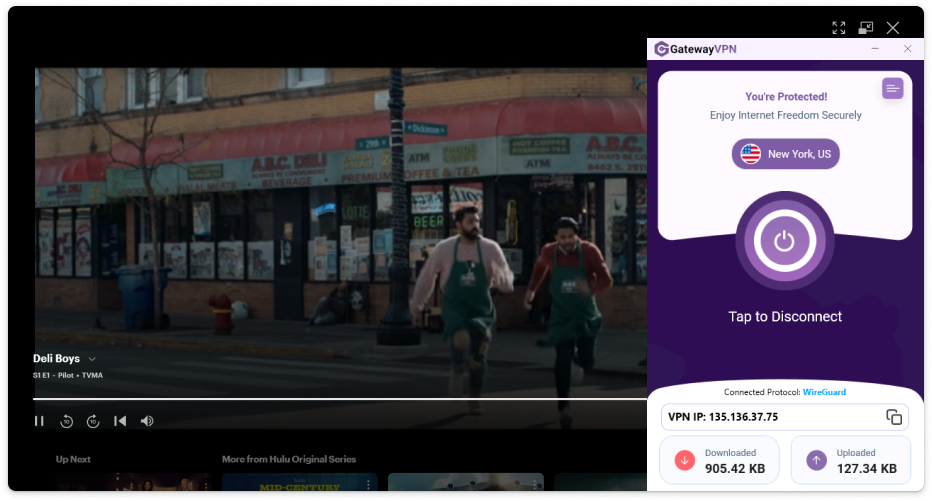
Watching Hulu on a desktop or laptop is usually the cleanest option.
Download GatewayVPN for Windows or macOS, install the app, and connect to a US VPN server. Once connected, open Hulu in your browser, sign in, and start watching.
If Hulu still shows a location or proxy message, try clearing your browser cookies, closing the browser, reconnecting to the VPN, and opening Hulu again. Browsers are notorious for remembering things you wish they’d forget.
How to Watch Hulu Outside the US on Smart TV, Apple TV, and Fire TV Stick
Smart TVs, Apple TV, and Fire TV Stick can be a little trickier because some streaming devices do not support VPN apps directly. Lovely, isn’t it?
You still have a few options, though:
- Set up GatewayVPN on your router so your TV uses the VPN connection automatically.
- Use connection sharing from a Windows PC or Mac.
- Use a mobile hotspot if your device and network setup support it.
For the full setup steps, you can use these guides:
- How to Set Up GatewayVPN on Your Router
- How to Set Up GatewayVPN on Smart TVs
- How to Set Up GatewayVPN on Apple TV
- How To Set Up GatewayVPN on Amazon Fire TV
Once the VPN connection is running through your router, shared connection, or hotspot, open Hulu on your TV device, sign in, and start streaming.
Hulu Not Working With VPN? Try These Fixes
Sometimes Hulu works right away. Beautiful. Other times, it throws a tantrum and gives you a location error, proxy warning, or endless loading screen that feels personally targeted.
Don’t panic yet. If Hulu is not working with your VPN, try these fixes before giving up.
Switch to Another US Server
Start with the simplest fix: change servers.
The US VPN server you’re connected to may be overloaded, slow, or already detected by Hulu. It happens. Streaming platforms often flag certain VPN IP addresses, especially if too many people are using the same one.
Open GatewayVPN, disconnect from your current server, and connect to another United States server. Then close Hulu, reopen it, and try again.
Clear Browser Cookies and Cache
Your browser may still be carrying old location data. Sneaky little thing.
Cookies and cached files can tell Hulu where you were before you connected to the VPN, which may trigger a location error even if your VPN is working properly. Clear your browser cookies and cache, reconnect to the US server, and open Hulu again.
If you’re using a browser, this step is worth doing. Seriously.
Restart the Hulu App or Browser
Don’t just minimize Hulu. Close it completely.
On mobile, swipe the Hulu app away from your recent apps. On desktop, fully close your browser. Then reconnect GatewayVPN to a US server and open Hulu again.
It sounds basic, but apps love holding onto old sessions. A clean restart gives Hulu a fresh look at your connection instead of dragging yesterday’s location data into today’s problem.
Disable Location Services
On phones and tablets, Hulu may use more than just your IP address. Some apps can also check GPS, Wi-Fi, or device location signals.
If Hulu keeps detecting that you’re outside the US, try disabling location services for the Hulu app. Then restart the app while connected to a US VPN server.
This is especially useful on iPhone, iPad, and Android, where app permissions can quietly make things messy.
Check for DNS or IP Leaks
A VPN should hide your real IP address, but sometimes leaks can happen. Not ideal.
A DNS or IP leak means part of your connection may still reveal your actual location, even while the VPN appears connected. Hulu can use that mismatch as a red flag and block playback.
If you suspect this is happening, check your visible IP address and DNS location while connected to the VPN. They should point to the US, not your real country.
Update the VPN App
An outdated VPN app can cause connection problems, server issues, or missing fixes that help with streaming reliability.
Open the App Store, Google Play, or your desktop app installer and make sure GatewayVPN is updated to the latest version. Then restart the app, connect to a US server, and try Hulu again.
Yes, it’s the boring update advice. But boring works sometimes.
Contact Support
If Hulu still does not work with VPN after trying the steps above, contact GatewayVPN support.
They can help you choose the best US server for Hulu, check whether there’s a connection issue, and walk you through the right fix for your device. Much better than wasting an hour clicking random servers like you’re trying to crack a safe.
What Is the Hulu VPN Error?
The Hulu VPN error usually shows up when Hulu thinks you’re using a VPN, proxy, or some other location-masking tool. In other words, Hulu looks at your connection, squints a little, and says, “Hmm, this doesn’t look quite right.”
That can happen even if your VPN is connected properly. Annoying, yes. But not unusual.
Most of the time, the error appears because Hulu has detected the VPN server IP address you’re using. Some server IPs get flagged when too many people use them for streaming, especially if they all seem to appear from the same place at the same time. To Hulu, that can look suspicious.
But a flagged server isn’t the only reason. The problem can also happen when your browser cookies still show a previous location, your DNS or device location leaks outside the VPN, or the Hulu app simply needs a clean restart. Apps get stubborn. Browsers too.
So, if Hulu is not working with VPN, don’t assume the whole setup is broken. Try switching to another US server, clearing cookies, checking for leaks, and reopening Hulu after the VPN connection is active. A few small fixes can often clear the error without turning the whole thing into a tech support saga.
How to Choose the Best VPN for Hulu
Not every VPN is built for streaming. Some are fine for basic privacy, some are decent for public Wi-Fi, and some fall apart the second Hulu gives them a hard stare. So, when you’re choosing the best VPN for Hulu, you want more than a pretty app and a big “connect” button.
Here’s what actually matters.
US VPN Servers
First, the VPN needs reliable servers in the United States. Obvious? Sure. But still important.
Since Hulu is mainly available in the US, your VPN should let you connect through a US server before opening Hulu. A good server gives you a US-based IP address, which helps Hulu see your connection as coming from the right region.
Ideally, you want multiple US server options too. Because if one server is slow, crowded, or detected, you can switch instead of sitting there refreshing the page like it owes you money.
Fast Streaming Speeds
Hulu needs a steady connection, especially if you want HD streaming without buffering every few minutes.
A slow VPN can turn a simple episode into a stop-start mess. Picture the dramatic scene freezing right before the big reveal. Terrible timing. So look for a VPN with fast servers, unlimited bandwidth, and stable performance during peak hours.
Speed is not just about download numbers either. Consistency matters. A connection that jumps all over the place can be just as annoying as a slow one.
Reliable IP Addresses
A good VPN for Hulu should offer IP addresses that are less likely to be blocked or flagged.
Streaming platforms often detect VPN servers when too many users connect from the same IP address. Once that happens, you may run into the Hulu VPN error or see the usual proxy message. Fun little disaster.
That’s why reliable IP addresses matter. The better the VPN is at maintaining clean, usable US IPs, the less time you’ll spend switching servers and muttering at your screen.
Apps for Your Devices
The best VPN is the one you can actually use on the devices you watch Hulu on.
Look for apps for iPhone, Android, Windows, and macOS, plus router support if you want to watch on smart TVs, Apple TV, Fire TV Stick, or other devices that may not support VPN apps directly.
This is where convenience comes in. Nobody wants to read a 40-step setup guide just to watch one episode after dinner. The easier the app is to install and connect, the better.
Strong Privacy and Security
A VPN for Hulu should also protect your connection properly, not just change your visible location.
Look for strong encryption, a clear no-logs policy, and secure VPN protocols. These features help keep your browsing activity private and your connection safer, especially when you’re using hotel Wi-Fi, airport Wi-Fi, café Wi-Fi — basically any Wi-Fi network with a name like “Free_Public_Internet_5G.” Suspicious little thing.
Good streaming access is great. Privacy should still come along for the ride.
Helpful Customer Support
Even with a good VPN, Hulu may not work perfectly every single time. Servers get crowded. IPs get flagged. Apps get weird. It happens.
That’s why helpful support matters. If Hulu is not working with VPN, support can point you toward the right US server, help you fix connection issues, and save you from blindly trying every setting in the app.
Because honestly, server roulette gets old fast.
Can You Use a Free VPN to Watch Hulu Outside the US?
You can try. But honestly? A free VPN is usually not the smoothest way to watch Hulu outside the US.
Free VPNs tend to have a few problems that make streaming feel like a chore. They often have limited US servers, which means everyone piles onto the same handful of locations. Those servers get crowded fast, speeds drop, and suddenly your “relaxing night of streaming” turns into a buffering festival. Nobody asked for that.
There’s also the IP problem. Free VPN IP addresses are usually overused, and streaming platforms are pretty good at noticing when thousands of people are connecting from the same address. Once that IP gets flagged, Hulu may show a location or proxy error instead of loading your show. So much for getting Hulu unblocked.
And then come the data limits. Some free VPNs only give you a small amount of data per day or month, which might be fine for checking email, but HD streaming eats through that allowance quickly. One episode in, and boom, you’re out. Very glamorous.
That’s why a premium VPN is usually the better choice if you want to unblock Hulu more reliably. The best VPN for Hulu should offer fast US servers, stronger connection stability, less crowded IP addresses, and apps that don’t make you feel like you’re wrestling with a toaster.
Free can sound tempting. Of course it does. But for Hulu, stable streaming usually needs a VPN that’s actually built to handle streaming — not one that collapses the second you press play.
FAQs
Can I watch Hulu outside the US?
Yes, you can try watching Hulu outside the US by connecting to a US VPN server before opening Hulu. The key is to connect first, then launch Hulu. If you open Hulu before the VPN is active, it may already detect your real location and throw up a location error. Annoying little detail, but it matters.
What is the best VPN for Hulu?
The best VPN for Hulu should have fast US servers, reliable IP addresses, strong privacy features, and apps for the devices you actually use. iPhone, Android, Windows, macOS, maybe even router support if you watch on a smart TV.
Speed matters too. A VPN that technically connects but buffers every 30 seconds is not really helping anyone, is it?
Why is Hulu not working with my VPN?
Start by switching to another US server. Then clear your cookies and cache, restart Hulu completely, disable location services if you’re on mobile, and reconnect the VPN before opening Hulu again.
Don’t just refresh the page twenty times. We’ve all done it. It rarely works.
Can I unblock Hulu with a VPN?
Yes, a VPN can help you unblock Hulu by routing your connection through a US server. This gives you a US-based IP address, which can help Hulu see your connection as coming from the United States.
For the best results, use a reliable VPN server and open Hulu only after the VPN connection is active.
Do I need a US server to watch Hulu?
Yes. You should connect to a United States VPN server because Hulu is primarily available in the US.
Connecting to another country usually won’t help. Hulu needs to see a US-based connection, so pick a US server before opening the Hulu app or website.
Does Hulu block VPNs?
Yes, Hulu can detect and block some VPN or proxy connections. That’s why some VPN servers work one day and fail the next. Streaming platforms often flag IP addresses that look overused or suspicious.
This is also why using a reliable VPN server matters. If one US server does not work, switch to another, restart Hulu, and try again.
Conclusion
Watching Hulu outside the US mostly comes down to one simple routine: connect through the United States before Hulu gets a chance to check your location.
Download GatewayVPN, connect to a US server, then open Hulu. After that, sign in to your existing account or create a new one if needed, choose something to watch, and start streaming. Easy enough when everything behaves.
And if it doesn’t? Also normal. Streaming apps can be a bit dramatic.
If Hulu does not work right away, switch to another US server, clear your browser cookies, restart the Hulu app or browser, and disable location services if you’re on mobile. If you’re still stuck, contact GatewayVPN support for help choosing the right server instead of wasting the evening guessing.
Download GatewayVPN and watch Hulu outside the US with a secure US VPN connection.