

Tubi kind of sneaks up on you. One minute you’re “just browsing,” the next you’re three episodes deep in a random crime series you didn’t even know existed—and somehow… it’s free. That’s the hook. Tubi TV is a legit, ad-supported streaming platform packed with movies, shows, and the occasional hidden gem you’d swear was buried on purpose.
But here’s the catch (there’s always a catch, right?): location matters. A lot.
Try opening it outside the U.S., and suddenly the vibe changes—content disappears, or worse, you get that polite-but-annoying “not available in your region” message. So, does Tubi work outside the US? Technically, yes… but not in the way you’d hope. The full library? Locked behind geo-blocks.
And that’s where things get interesting.
A VPN for Tubi TV essentially lets you sidestep those digital borders. It reroutes your connection through a U.S. server, making it look like you’re lounging somewhere in California instead of, well, wherever you actually are. Simple trick, surprisingly effective. If you’re trying to unblock Tubi, this is usually the cleanest way to do it—no hacks, no sketchy workarounds.
Of course, not every VPN plays nice with Tubi (some get flagged, others just… fail quietly). But when it works? It really works.
Why You Need a VPN for Tubi TV
Here’s the blunt truth—Tubi isn’t being difficult for fun. It’s all about licensing. Movies and shows are tied up in regional agreements (messy, expensive, and very legal), which means what you can watch depends heavily on where you’re physically located. So if you’ve ever wondered, does Tubi work with VPN? or does Tubi work outside the US?… the real answer is: not fully, not fairly.
Outside the U.S., Tubi either shrinks its library or blocks access entirely. You might still load the site, sure—but the good stuff? Gone. It’s like walking into a supermarket where half the shelves are empty. Frustrating doesn’t even cover it.
That’s exactly why people turn to a VPN for Tubi TV. By masking your real IP address and routing your connection through a U.S. server, a VPN essentially tells Tubi, “Hey, I’m in the States”—even if you’re halfway across the world. And just like that, the doors open. Full catalog. No weird restrictions.
Now, not every VPN gets the job done. Some struggle with Tubi TV VPN access, others trigger that dreaded “Tubi TV VPN not working” moment where nothing loads properly. It happens. Streaming platforms are constantly tightening the screws.
Still, with the right setup, using a Tubi VPN becomes second nature. Click, connect, stream. No hoops, no headaches—well, mostly.
How to Watch Tubi TV With a VPN
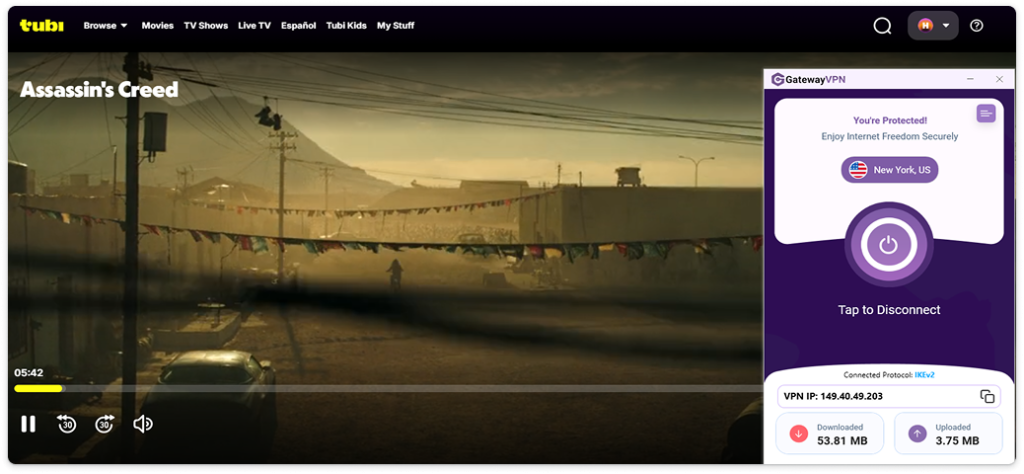
Honestly, this part is easier than people expect. No tech wizardry, no rabbit holes—just a few quick steps and you’re in. If your goal is to access Tubi TV outside the USA without hitting those annoying walls, here’s how to do it with GatewayVPN:
- Download and Install GatewayVPN.
First things first, grab GatewayVPN on your device—Android, iOS, laptop, whatever you’re using. The install takes maybe a minute or two. Once it’s set up, log in, and you’re good to go. - Connect to a U.S. Server.
Open the app and choose a U.S. location. This step does the heavy lifting. It’s what makes it look like you’re browsing from inside the States, which is exactly what you need for smooth Tubi TV VPN access. One tap, and you’re virtually there. - Open Tubi and Start Streaming.
Now head over to Tubi—either through your browser or the app. No extra tweaks, no weird settings. If everything’s working as it should, you’ll instantly unblock Tubi and unlock the full library. Movies, shows, the whole deal.
And that’s it. Three steps.
If you ever run into the classic “Tubi TV VPN not working” hiccup, switching servers usually does the trick—but more on that later.
What to Look for in a VPN for Tubi TV
Not all VPNs are built the same—and yeah, that becomes painfully obvious the moment your stream starts buffering every 10 seconds. Or worse, Tubi just refuses to load. So if you’re serious about using a VPN for Tubi TV, there are a few things that actually matter (and a bunch of marketing fluff you can safely ignore).
Let’s break it down.
1. Reliable Unblocking (This One’s Non-Negotiable)
First and foremost, the VPN has to actually work. Sounds obvious, but you’d be surprised. Streaming platforms like Tubi actively detect and block VPN traffic, so only a handful of providers consistently stay one step ahead.
If your goal is smooth Tubi TV VPN access, you need a service that regularly refreshes its IPs and can bypass those geo-restrictions without triggering errors. Otherwise, you’re stuck in that loop of “reload, reconnect, try again”… not fun.
2. Fast Speeds (Because Buffering Kills the Mood)
Speed matters more than people think. Even a small slowdown can turn HD streaming into a pixelated mess. VPNs naturally add some overhead, but the good ones keep it barely noticeable.
As a rough benchmark, you’ll want at least 5–10 Mbps for HD and more if you’re aiming higher. Anything less, and… well, you’ll feel it.
3. Plenty of U.S. Servers
This is a big one for Tubi TV outside USA access. The more U.S. servers a VPN offers, the better your chances of finding a fast, unblocked connection.
Why? Because crowded servers slow things down, and blocked servers stop things entirely. Having options means you can switch quickly if one doesn’t cooperate—which, honestly, happens more than people admit.
4. Device Compatibility
Trying to figure out how to unblock Tubi on school Chromebook? Yeah, that can get tricky. Not every VPN works smoothly across all devices or restricted networks.
A solid VPN should have easy-to-use apps for mobile, desktop, and ideally browser extensions too. The smoother the setup, the less likely you are to rage-quit halfway through.
5. Strong Privacy Features (The Quiet Bonus)
This isn’t just about streaming. A good VPN also protects your data—encrypting your connection and hiding your IP so your ISP (and anyone else snooping around) can’t see what you’re doing.
It’s one of those things you don’t notice… until you realize how exposed you were without it.
At the end of the day, choosing the best VPN for Tubi TV comes down to performance, not promises. If it can consistently unblock Tubi, stream without hiccups, and keep your connection stable—you’re set. Everything else is just extra.
Tubi TV VPN Not Working? Here’s What’s Going On (and How to Fix It)
So—you’ve done everything right. You grabbed a VPN, connected to the U.S., opened Tubi… and boom. Error message. Or worse, nothing loads at all.
Yeah, frustrating. And oddly common.
Let’s unpack it a bit.
Why Your Tubi VPN Isn’t Working
Sometimes it’s not you—it’s the system working against you. Tubi actively blocks certain VPN IP addresses to enforce licensing restrictions, which means if your server gets flagged, access is cut off instantly.
Other times, it’s more mundane (and slightly annoying):
- The server you picked is overcrowded or already blacklisted
- Your real location is leaking through DNS or cookies
- Your internet connection is unstable
- Or—this one surprises people—your ad blocker is interfering with Tubi’s ad-supported model
And occasionally? It’s just bad luck. You connected to the wrong server at the wrong time.
Quick Fixes That Usually Work
Before you give up on trying to unblock Tubi, try this:
1. Switch to Another U.S. Server
This solves more issues than you’d think. If one server is blocked, another might work instantly.
2. Clear Cookies & Cache
Your browser might still be “remembering” your real location. Wipe it clean, reload, try again. It’s a small step—but weirdly effective.
3. Disable Ad Blockers
Tubi runs on ads. Block the ads, and sometimes it blocks you back. Fair game, I guess.
4. Check for Leaks (or Just Reconnect)
If your VPN drops even for a second, your real IP can slip through. Reconnect, or enable features like a kill switch to stay covered.
5. Try a Different Device or Browser
Sounds random, but it works. Some users report Tubi loading in a browser but not the app—or vice versa.
At the end of the day, the whole “Tubi TV VPN not working” issue usually comes down to detection—not failure. The trick is staying one step ahead. Switch servers, tweak a setting or two… and more often than not, you’re back to streaming like nothing happened.
FAQs: VPN For Tubi TV
Does Tubi work outside the US?
Short answer? Not really—at least not the full version.
Tubi is technically available in a few regions, but the content library changes… a lot. If you’re trying to access the U.S. catalog while abroad, you’ll quickly notice things missing. That’s why many users turn to a VPN for Tubi TV to make it feel like they’re browsing from inside the States.
Does Tubi work with a VPN?
Yes—but it depends on the VPN.
Some services get blocked almost instantly, while others manage to provide stable Tubi TV VPN access. If your VPN can consistently bypass geo-restrictions and avoid detection, you’ll be able to stream without issues. If not… you’ll probably run into errors.
What is the best VPN for Tubi TV?
It comes down to reliability, speed, and strong U.S. servers.
The best VPN for Tubi TV is one that can consistently unblock Tubi, maintain fast streaming speeds, and avoid detection. GatewayVPN is built with streaming in mind, so you’re less likely to deal with buffering or blocked servers—though, like anything online, occasional hiccups can still happen.
How to watch Tubi TV outside the USA?
You’ll need a VPN. That’s the simplest way.
Connect to a U.S. server using a Tubi VPN, then open Tubi as you normally would. Once connected, you should be able to access the full library as if you were physically in the U.S.
Why is my Tubi TV VPN not working?
Usually, it’s a server issue.
If you’re seeing errors, it could mean the IP you’re using has been blocked. Try switching servers, clearing your browser data, or reconnecting your VPN. These quick fixes solve most Tubi TV VPN not working problems.