
BBC iPlayer is brilliant until it isn’t.
You’re abroad, you’ve got a spare evening, maybe you want to catch up on a BBC drama, watch live TV, stream the news, or disappear into a documentary rabbit hole for an hour. You open BBC iPlayer and—bang. A location message. Or worse, you search for the app and it simply isn’t there. Not hidden. Not shy. Just gone from your App Store or Google Play Store like it packed a bag and moved back to Britain.
That’s because BBC iPlayer is mainly built for viewers in the UK. The service offers live BBC channels, on-demand shows, documentaries, comedies, dramas, sports, news, and plenty of other very British telly goodness, but access can get awkward once you’re outside the country. Sometimes the website won’t play. Sometimes the app won’t show up in your local store. Annoying? Very. Fixable? Usually, yes.
In this guide, we’ll walk through how to watch BBC iPlayer abroad, how to use a VPN for BBC iPlayer, and how to get BBC iPlayer working on desktop, mobile, and other devices. We’ll also cover one bit people often miss: how to install the BBC iPlayer app outside the UK by changing your App Store or Google Play region to the UK.
So, not just “connect to a VPN and hope for the best.” We’ll go through the proper steps — the app store bit, the VPN bit, and the small troubleshooting bits that save you from repeatedly tapping refresh like it owes you money.
Can You Watch BBC iPlayer Abroad?
Yes, you can watch BBC iPlayer abroad, but it’s not always as simple as opening the app and pressing play. Lovely when it works. Maddening when it doesn’t.
BBC iPlayer is designed mainly for viewers in the UK, which means access from outside the country can be restricted. If you try to stream while travelling, living abroad, or using a non-UK internet connection, you may run into a location message, a playback error, or a stream that just refuses to load. The app can be a bit fussy like that.
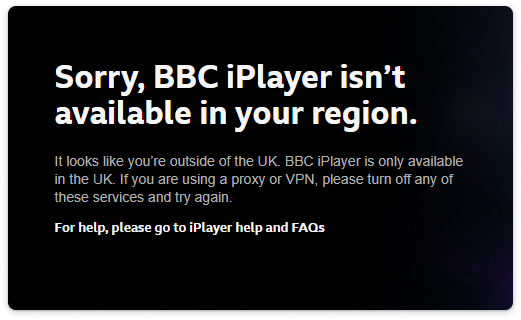
There’s another catch, too. On mobile, BBC iPlayer may not appear in your local App Store or Google Play Store at all. That doesn’t always mean your phone has a problem. It usually means your store region is not set to the UK, so the app is not listed for your current country.
So there are two separate things to think about:
First, the streaming connection. To watch BBC iPlayer abroad, you usually need to connect to a UK VPN server before opening the website or app.
Second, the app download. If you’re on an iPhone, iPad, or Android and can’t find BBC iPlayer, you may need to change your App Store or Google Play country to the UK before installing it.
In plain English: the VPN helps BBC iPlayer see a UK connection, while your app store region decides whether the BBC iPlayer app shows up for download in the first place. Two different doors. Same house.
What You Need to Watch BBC iPlayer Abroad
Before you can get BBC iPlayer abroad, you’ll need a few things in place. Nothing wildly technical. No secret decoder ring. Just the basics, set up in the right order.
A VPN with UK Servers
The big one is a VPN for BBC iPlayer that offers UK servers and has enough speed for streaming. That matters because BBC iPlayer needs to see a UK connection before it lets you watch, and a slow or overloaded VPN server can turn your evening plans into a buffering slideshow. Nobody wants that.
With GatewayVPN, the process is straightforward:
- Download GatewayVPN.
- Connect to a UK server.
- Open BBC iPlayer.
- Sign in and start streaming.
That’s the clean version. In real life, you may sometimes need to switch UK servers or restart the app, especially if BBC iPlayer has cached your old location. But generally, the idea is simple: connect through the UK first, then open iPlayer.
A BBC Account
You’ll also need a BBC account to use BBC iPlayer. This is the account you sign in with before watching live channels, shows, documentaries, news, sports, and all the rest of it.
If you already have one, great. Use that. If not, you’ll need to create one before streaming. Keep the details handy too, because BBC iPlayer has a habit of asking you to sign in right when you’ve finally settled down with snacks. Classic.
The BBC iPlayer App or Website
Desktop users usually have the easiest route. Open your browser, connect GatewayVPN to a UK server, go to the BBC iPlayer website, sign in, and stream from there.
On mobile, it can be a little more fiddly. iPhone, iPad, and Android users may need to install the BBC iPlayer app first. If you search for it and nothing shows up, don’t panic. Your phone probably hasn’t betrayed you. More likely, your App Store or Google Play region is not set to the UK, which means BBC iPlayer is hidden from your local store.
So, to put it plainly: the website is usually best for desktop, while mobile users may need both the BBC iPlayer app and a UK VPN connection. The app gets you in the door. The VPN helps make the stream work once you’re there.
How to Watch BBC iPlayer Abroad with GatewayVPN
Once the app and account side of things is sorted, watching BBC iPlayer abroad with GatewayVPN is pretty painless. The trick is to connect to the VPN before BBC iPlayer gets a chance to check your location. Order matters here. A bit annoying, yes, but easy enough once you know the rhythm.
Step 1: Download GatewayVPN
Start by downloading GatewayVPN on the device you want to use for BBC iPlayer.
GatewayVPN works on:
So whether you’re watching from a hotel room laptop, your phone on airport Wi-Fi, or an iPad balanced on the kitchen counter like some sort of tiny cinema screen, you can set up the VPN first and then open BBC iPlayer after.
Step 2: Connect to a UK VPN Server
Next, open GatewayVPN and choose a UK server.
This is the important bit. To use a VPN for BBC iPlayer, your connection should be routed through the UK before you open the BBC iPlayer website or app. If BBC iPlayer checks your location before the VPN is connected, it may remember your non-UK location and throw up an error. Streaming platforms can be stubborn like that.
So, connect first. Then stream.
Step 3: Open BBC iPlayer
Once GatewayVPN is connected to a UK server, open BBC iPlayer.
On desktop, you can use the BBC iPlayer website through your browser. On iPhone, iPad, or Android, open the BBC iPlayer app instead. If you haven’t installed the app yet and it doesn’t appear in your store, your App Store or Google Play region may need to be changed to the UK first.
Small thing, big difference.
Step 4: Sign In to Your BBC Account
Now sign in with your BBC account.
No complicated dance here. Just enter your account details and continue. If you’re already signed in, even better — one less tiny hurdle between you and whatever you were trying to watch.
Step 5: Start Watching BBC iPlayer Abroad
That’s it. Once you’re connected through a UK server and signed in, you can start watching BBC iPlayer abroad.
You can stream live BBC channels, catch up on shows, browse documentaries, watch sports coverage, follow the news, or dip into on-demand episodes whenever you fancy. GatewayVPN handles the UK connection in the background, while you get on with the important part: actually watching the thing.
How to Install the BBC iPlayer App Outside the UK
If you’re outside the UK, BBC iPlayer may not appear when you search for it in the App Store or Google Play Store. Annoying, but common.
This usually happens because your Apple Account or Google Play country is set to a region where BBC iPlayer is not listed. BBC also notes that app availability can depend on the country or region linked to your app store account.
A VPN helps you connect through the UK, but it does not always change what apps appear in your app store. Your store region controls that part.
So, to install BBC iPlayer outside the UK, you may need to change your App Store or Google Play country to the UK first. Then search for BBC iPlayer, install the app, connect GatewayVPN to a UK server, and open iPlayer.
Simple version: store region gets you the app. The VPN helps you stream.
How to Install BBC iPlayer on iPhone or iPad Outside the UK
If BBC iPlayer doesn’t show up on your iPhone or iPad, the problem is probably not your device. It’s usually your App Store country. To install BBC iPlayer outside the UK, you may need to switch your Apple Account region to the UK first.
Step 1: Open Your Apple Account Settings
On your iPhone or iPad, open:
Settings → Your Name → Media & Purchases → View Account → Country/Region
This is the section Apple uses for changing your Apple Account country or region. A little buried, because of course it is.
Step 2: Change Your App Store Country to the UK
From the Country/Region menu, choose the United Kingdom as your new region.
Once your App Store country is set to the UK, your App Store should start showing apps available in the UK store, including BBC iPlayer.
Step 3: Accept the Terms and Update Billing Details
Apple may ask you to accept new terms and update your billing information.
Use accurate details that match Apple’s requirements. Don’t just mash in random information and hope for the best — Apple can be picky about this stuff.
Also, keep in mind that some things may stop you from changing region right away, such as active subscriptions, remaining store credit, or certain payment settings. If Apple blocks the change, check those first.
Step 4: Search for BBC iPlayer in the App Store
After your region is set to the UK, open the App Store and search for BBC iPlayer.
If everything updated properly, the app should appear. Install it like any other app.
Step 5: Connect to a UK VPN Server Before Opening BBC iPlayer
Changing your App Store region helps you find and install the BBC iPlayer app. GatewayVPN helps with the streaming side.
Before opening BBC iPlayer, launch GatewayVPN and connect to a UK server. Then open BBC iPlayer, sign in, and start watching.
So, the order is simple: UK App Store region first, install the app, connect to a UK VPN server, then open BBC iPlayer.
How to Install BBC iPlayer on Android Outside the UK
Android can be a bit more particular about this than people expect. You might connect to a UK VPN server and still not see BBC iPlayer in Google Play. That’s because Google Play uses your Play country, not just your current IP address, to decide which apps appear.
Step 1: Open Google Play Store Settings
Open the Google Play Store app, then go to:
Profile Icon → Settings → General → Account and device preferences → Country and profiles
This is where Google shows your Play country settings. It’s not exactly front-and-centre, but it’s there.
Step 2: Connect to a UK VPN Server and Change Your Google Play Country
Before changing your Google Play country, connect GatewayVPN to a UK server. This helps Google Play detect a UK connection, which may allow the United Kingdom option to appear under your Play country settings.
Once connected, go back to Country and profiles and check whether you can switch your Google Play country to the UK.
Small catch: the option does not always appear for everyone. Google usually shows it only when your account looks eligible for a country change. Payment settings, account history, and other Google Play rules can also affect whether the option appears. A bit fussy, yes, but that’s Google Play being Google Play.
Also, don’t expect the change to happen instantly every time. Google says Play country changes can take time to update, sometimes up to 48 hours.
So, connect to a UK server first, switch your Play country to the UK if the option appears, then give Google Play a little time to catch up before searching for BBC iPlayer again.
Step 3: Search for BBC iPlayer
Once your Play Store country is set to the UK, search for BBC iPlayer in Google Play.
At this point, the app should be much easier to find. If it still doesn’t show up, close and reopen Google Play, clear the Play Store cache, or check whether the country change has actually been applied.
Step 4: Install the BBC iPlayer App
Install the official BBC iPlayer app from Google Play.
The Android app lets you watch live TV and stream on-demand BBC shows, documentaries, dramas, comedy, news, sports, and other BBC content. Basically, the good stuff you came for.
Step 5: Connect GatewayVPN to a UK Server
Before opening BBC iPlayer, open GatewayVPN and connect to a UK server.
This part matters. Changing your Google Play country helps you install BBC iPlayer outside the UK, but GatewayVPN helps create the UK connection BBC iPlayer needs when you actually stream.
Install first. Connect second. Then open BBC iPlayer and start watching.
App Store Region vs VPN Location: What’s the Difference?
This part trips people up all the time, so let’s separate the two.
Your App Store or Google Play region controls which apps you can find and download. If your store country is set to France, Spain, the UAE, Lebanon, or anywhere else outside the UK, BBC iPlayer may not appear when you search for it. The app might be available, just not in your version of the store. A bit like walking into the wrong branch of the same supermarket and wondering why the good biscuits aren’t there.
Your VPN location is different. That controls the internet location BBC iPlayer sees when you open the app or website. So when you connect GatewayVPN to a UK server, BBC iPlayer sees a UK connection instead of your actual location abroad.
In many cases, you need both:
- A UK App Store or Google Play region to install the BBC iPlayer app.
- A UK VPN server to watch BBC iPlayer abroad.
So if BBC iPlayer is missing from your app store, changing VPN servers probably won’t fix that on its own. And if the app is installed but won’t stream, changing your store region probably won’t fix that either.
Different problems. Different fixes. Annoying, yes, but once you know which lever does what, the whole setup becomes much easier.
How to Watch BBC iPlayer Abroad on Different Devices
The basic idea is the same on every device: get BBC iPlayer installed if needed, connect GatewayVPN to a UK server, then open iPlayer. The fiddly part is that each device handles apps and VPN connections a little differently. Naturally. Because one simple setup would be far too generous.
On iPhone and iPad
If you want to watch BBC iPlayer abroad on iPhone or iPad, start by checking whether the app appears in the App Store.
If it doesn’t, your App Store region may need to be changed to the UK first. Once that’s done, install the BBC iPlayer app, open GatewayVPN, and connect to a UK server before launching iPlayer.
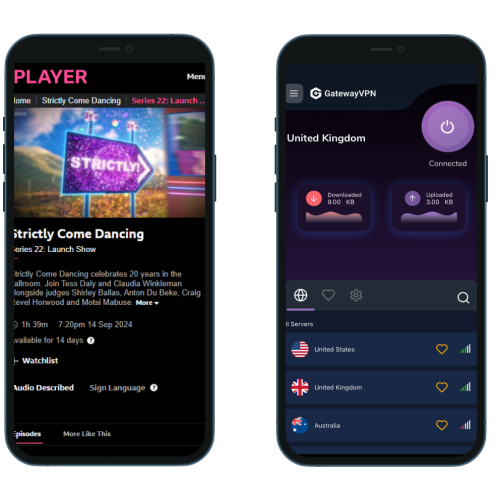
The order looks like this:
- Change your App Store region to the UK if BBC iPlayer is missing.
- Install BBC iPlayer.
- Open GatewayVPN.
- Connect to a UK server.
- Open BBC iPlayer and start streaming.
Simple enough once the app is actually on your device.
On Android
Android works in a similar way, though Google Play has its own little maze.
If BBC iPlayer does not appear in Google Play, check whether your Google Play country is set to the UK. After the store region is updated, search for BBC iPlayer, install the app, and then connect GatewayVPN to a UK server.
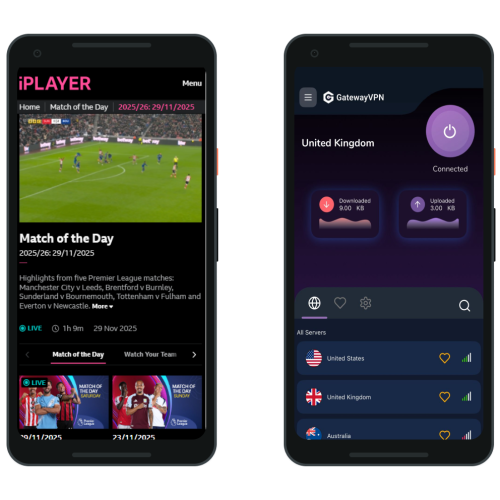
In short:
- Change your Google Play country to the UK if needed.
- Install BBC iPlayer.
- Connect to a UK server in GatewayVPN.
- Open the BBC iPlayer app.
- Sign in and stream.
If the app still doesn’t appear straight away, give Google Play some time to update. Sometimes it moves at the speed of wet cement.
On Windows and Mac
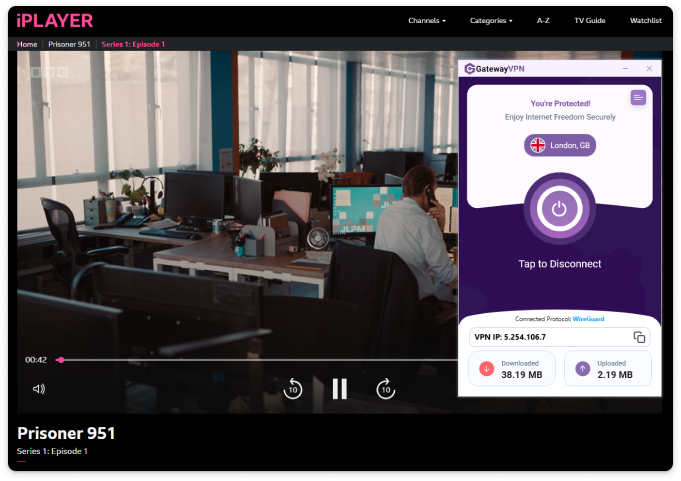
Watching on desktop is usually the cleanest route.
Download GatewayVPN on your Windows PC or Mac, connect to a UK server, then visit BBC iPlayer in your browser. Sign in with your BBC account and start watching.
No app store region changes. No mobile store drama. Just browser, VPN, iPlayer.
On Smart TV, Apple TV, Fire TV Stick, and Consoles
TV devices are where things can get a little awkward. Some smart TVs, streaming sticks, and consoles do not support VPN apps directly, which means you may need to set up GatewayVPN another way.
The usual options are:
- Install GatewayVPN on your router.
- Share a VPN connection from your Windows PC or Mac.
- Use mobile hotspot sharing, where your device supports it.
For the full setup, link to your device guides here:
- How to set up GatewayVPN on your router
- How to set up GatewayVPN on Smart TVs
- How to set up GatewayVPN on Apple TV
- How To Set Up GatewayVPN on Amazon Fire TV
Once the VPN connection is handled at the router or shared-network level, your TV device can use BBC iPlayer through that UK connection. More steps, yes. But still doable.
Why You Need a VPN for BBC iPlayer Abroad
A VPN for BBC iPlayer isn’t just a nice extra. If you’re outside the UK, it’s usually the main piece that makes streaming possible in the first place.
BBC iPlayer checks where your internet connection appears to come from. So if you’re sitting in Spain, France, Canada, Dubai, or anywhere else abroad, iPlayer may see that non-UK location and block playback. Fairly blunt. Not much room for negotiation.
That’s where a VPN comes in.
UK Server Access
To watch BBC iPlayer abroad, you need your connection to appear as if it’s coming from the UK. A VPN with UK servers lets you do exactly that.
With GatewayVPN, you can connect to a UK server before opening BBC iPlayer. Once connected, your internet traffic is routed through that UK location, which helps BBC iPlayer see a UK-based connection instead of your actual location abroad.
That’s the whole point, really. UK server first. BBC iPlayer second.
Streaming Speed
Streaming is not very forgiving. A web page can load slowly and you’ll survive. A video that buffers every 20 seconds? Different story. That’s how laptops nearly get thrown across hotel rooms.
A good VPN for streaming BBC iPlayer needs fast, stable servers. You want enough speed for live TV, catch-up episodes, documentaries, sports, and longer on-demand sessions without constant buffering or sudden drops.
Reliable servers matter too. It’s not just about raw speed; it’s about consistency. BBC iPlayer should feel like watching TV, not babysitting a loading wheel.
Device Support
People don’t all watch the same way.
Some use BBC iPlayer on an iPhone during a commute. Some watch on an Android tablet in bed. Others prefer a Windows laptop, a MacBook, or a big TV setup in the living room. Very civilised.
That’s why device support matters when choosing a VPN for BBC iPlayer. GatewayVPN works across mobile and desktop devices, so you can connect to a UK server whether you’re watching on iPhone, iPad, Android, Windows, or macOS.
For smart TVs, streaming sticks, and consoles, you may need a router setup or connection sharing, but the idea stays the same: get the device using a UK VPN connection before opening BBC iPlayer.
Privacy and Security
There’s also the privacy side of things. Not the flashy part, maybe, but still important.
A VPN encrypts your connection, which helps protect your browsing activity from being easily seen on public Wi-Fi, hotel networks, airport Wi-Fi, cafés, and other shared connections. Handy when you’re travelling. Very handy, actually.
So while most people use a VPN for BBC iPlayer because they want UK access, the extra privacy and security benefits are a welcome bonus. You get a UK streaming connection, and your internet traffic gets a stronger layer of protection in the background.
BBC iPlayer Not Working Abroad? Try These Fixes
Sometimes BBC iPlayer still refuses to play, even after you’ve done the “right” things. Frustrating? Absolutely. But it doesn’t always mean the VPN has failed or your setup is broken. Often it’s one small thing: an old cookie, a stubborn app session, the wrong server, or the store region being mixed up with the VPN location.
Try these fixes before you give up and angrily rewatch something on YouTube instead.
Switch to Another UK VPN Server
BBC iPlayer may detect some VPN servers from time to time. It happens. Streaming platforms are constantly checking IP addresses, and one server may work better than another on a given day.
Open GatewayVPN, disconnect from your current UK server, and choose another UK location if available. Then reopen BBC iPlayer and try again.
Tiny move. Big difference sometimes.
Clear Browser Cookies and Cache
If you’re watching on Windows, Mac, or a mobile browser, your browser may still have old location data saved. Cookies can remember previous sessions, and BBC iPlayer may keep treating you like you’re still outside the UK even after you connect to a UK VPN server.
Clear your browser cookies and cache, then close the browser completely. After that, reconnect GatewayVPN to a UK server and open BBC iPlayer again.
Yes, it’s a bit tedious. But it works often enough to be worth doing.
Restart the BBC iPlayer App
On iPhone, iPad, or Android, close the BBC iPlayer app fully and reopen it after connecting to GatewayVPN.
Don’t just swipe away for a second and return to the same frozen mess. Properly close the app, connect to a UK server, then launch BBC iPlayer again. Apps love hanging onto old sessions like they’re precious family heirlooms.
Connect to the VPN Before Opening BBC iPlayer
The order matters more than people think.
Open GatewayVPN first. Connect to a UK server. Then open BBC iPlayer.
If you open BBC iPlayer before connecting to the VPN, the app or website may detect your actual location and keep that session active. So if BBC iPlayer is not working abroad, close it, connect to GatewayVPN, and start again in the right order.
Check Your App Store or Google Play Region
If BBC iPlayer does not appear in the App Store or Google Play Store, that’s usually not a VPN issue.
Your app store region controls which apps are available to download. GatewayVPN can help with the UK streaming connection, but it does not always change what appears in your app store. For that, your Apple Account or Google Play country may need to be set to the UK.
So if the problem is “I can’t find the BBC iPlayer app,” check your store region first. Different problem, different fix.
Update the BBC iPlayer App
An outdated BBC iPlayer app can cause login errors, playback problems, crashing, or strange loading issues. The boring fix is often the correct one.
Open the App Store or Google Play Store and check for updates. Install any available BBC iPlayer update, then connect GatewayVPN to a UK server and try again.
Not glamorous. Effective though.
Try the Browser Version
If the BBC iPlayer app still refuses to behave, try the browser version instead.
Connect GatewayVPN to a UK server, open your browser, visit BBC iPlayer, and sign in there. This can help you figure out whether the issue is with the app, your account, your VPN connection, or the device itself.
If the browser works but the app doesn’t, the app is probably the culprit. If neither works, switch UK servers, clear cookies, and test again.
Can You Use a Free VPN to Watch BBC iPlayer Abroad?
You can try. But don’t be shocked if it turns into a buffering circus.
Free VPNs usually struggle with BBC iPlayer because they have limited UK servers, and those servers are often packed with too many users at once. That means slower speeds, weaker reliability, and a higher chance that BBC iPlayer has already detected the IP address. Once that happens, you may connect to the UK on paper, open iPlayer, and still get blocked. Brilliant. Very useful.
There’s also the data cap problem. Some free VPNs give you just enough bandwidth to watch half an episode, maybe a trailer if you’re lucky, before they slow you down or cut you off completely. For streaming, that’s not exactly ideal.
A free VPN for BBC iPlayer may come with:
- Limited UK server options
- Overcrowded connections
- Slower streaming speeds
- Monthly or daily data limits
- IP addresses already flagged by streaming platforms
A premium VPN for BBC iPlayer, like GatewayVPN, gives you a much better setup for streaming. You get more reliable UK server access, stronger speeds, encrypted browsing, and a smoother experience across your devices.
So, yes, a free VPN might work for a minute. Maybe. But if you actually want to watch BBC iPlayer abroad without wrestling the loading wheel every few scenes, GatewayVPN is the better choice.
Best VPN Features for Streaming BBC iPlayer Abroad
Not every VPN is a good VPN for streaming BBC iPlayer. Some look fine on the surface, then fall apart the second you try to watch a live match, a new drama episode, or anything longer than a weather clip.
Here’s what actually matters.
UK Servers
This is non-negotiable. To watch BBC iPlayer abroad, your VPN needs UK servers so your connection can route through the United Kingdom.
Without a UK server, there’s no proper UK connection. And without that, BBC iPlayer is likely to show a location error instead of the show you came for. Bit of a dead end.
Fast Streaming Speeds
A VPN for streaming BBC iPlayer needs to be quick enough for live TV and on-demand video. Slow servers can cause buffering, quality drops, and that awful start-stop rhythm where a 30-minute episode somehow becomes a 50-minute ordeal.
GatewayVPN is built for stable, smooth connections, so you can spend less time staring at loading circles and more time actually watching.
Apps for iOS, Android, Windows, and macOS
You may want BBC iPlayer on your phone today, your laptop tomorrow, and your tablet next week. Fair enough. People move around.
A good VPN should work across your main devices, including iPhone, iPad, Android phones and tablets, Windows PCs, and macOS. GatewayVPN supports all of them, so you can connect to a UK server whether you’re watching from a desk, sofa, hotel bed, or airport chair with suspiciously bad posture.
Unlimited Bandwidth
Streaming burns through data quickly. Really quickly.
That’s why unlimited bandwidth matters. You don’t want your VPN cutting you off halfway through a live event or slowing you down after one episode. With GatewayVPN, you can stream without worrying about tiny data caps getting in the way.
Strong Encryption
Streaming might be the reason you came here, but security still counts.
GatewayVPN encrypts your connection, which helps protect your browsing activity on public Wi-Fi, hotel networks, airports, cafés, and other shared connections. Not glamorous, maybe. But useful. Especially when you’re travelling.
No-Logs Privacy
A VPN should protect your privacy, not quietly build a scrapbook of your activity.
Choose a VPN with a clear no-logs approach, so your browsing history and connection activity are not being stored or tracked. GatewayVPN is designed with privacy in mind, giving you a more secure way to browse and stream abroad.
Easy Server Switching
Sometimes one UK server may work better than another. That’s just how streaming platforms behave; they’re moody like that.
Easy server switching lets you quickly move to another UK server if BBC iPlayer doesn’t load right away. No complicated setup. No digging through technical menus. Just switch, reconnect, and try again.
For a smoother way to stream BBC iPlayer abroad, download GatewayVPN, connect to a UK server, open BBC iPlayer, and start watching with a secure UK VPN connection.
FAQs
How can I watch BBC iPlayer abroad?
To watch BBC iPlayer abroad, connect to a UK server with GatewayVPN first. Then open BBC iPlayer, sign in with your BBC account, and start streaming.
Do it in that order. VPN first, iPlayer second. It saves a headache.
What is the best VPN for BBC iPlayer?
The best VPN for BBC iPlayer should have UK servers, fast streaming speeds, reliable connections, and apps for the devices you actually use.
GatewayVPN is built for that kind of setup, with apps for mobile and desktop, secure UK server access, and easy server switching if one connection doesn’t behave.
Why can’t I find BBC iPlayer in the App Store?
BBC iPlayer may not appear in the App Store if your Apple Account region is not set to the UK.
This is separate from your VPN location. Even if you’re connected to a UK VPN server, the App Store may still show apps based on your Apple Account country.
Why can’t I find BBC iPlayer on Google Play?
If BBC iPlayer is missing from Google Play, your Google Play country may not be set to the UK. The app may also not be listed for your current Play Store region.
In that case, you may need to change your Google Play country to the UK before searching again.
How do I install BBC iPlayer outside the UK?
To install BBC iPlayer outside the UK, change your App Store or Google Play country to the UK, then search for BBC iPlayer and install the app.
After that, connect GatewayVPN to a UK server before opening BBC iPlayer. Store region gets you the app. VPN connection helps you stream.
Do I need a UK VPN server for BBC iPlayer?
Yes. If you’re abroad, you should connect to a UK VPN server before opening BBC iPlayer.
BBC iPlayer checks where your internet connection appears to come from, so a UK server helps create the right connection for streaming.
Can I watch BBC iPlayer abroad on Android?
Yes. On Android, install the BBC iPlayer app from the UK Google Play Store, connect GatewayVPN to a UK server, then open the app and sign in.
If BBC iPlayer does not appear in Google Play, check your Play Store country first.
Can I watch BBC iPlayer abroad on iPhone?
Yes. If BBC iPlayer does not appear in the App Store, change your App Store region to the UK, then install the app.
Once it’s installed, open GatewayVPN, connect to a UK server, launch BBC iPlayer, and stream.
Why is BBC iPlayer not working with my VPN?
BBC iPlayer may have detected the VPN server, your browser may still have old location data, or the app may need a restart.
Try switching to another UK server in GatewayVPN, clearing your browser cookies, closing and reopening BBC iPlayer, and making sure you connect to the VPN before opening the app or website.
Conclusion
Watching BBC iPlayer abroad is mostly about getting the order right. Not complicated, just slightly fussy.
Download GatewayVPN, connect to a UK server, then open BBC iPlayer through the website or mobile app. If the BBC iPlayer app is missing from your phone or tablet, check your App Store or Google Play country and switch it to the UK if needed. Once the app is installed, connect to GatewayVPN, sign in to your BBC account, and start streaming.
That’s the whole routine: UK app store region if you need the app, UK VPN server when you want to watch.
Download GatewayVPN and watch BBC iPlayer abroad with a secure UK VPN connection.