Yes! We stand by our service with a risk-free 30-day money-back guarantee. If you are not satisfied for any reason, you can get a full refund with no questions asked.
30-day money-back guarantee

Craving your favorite British dramas, live sports, and reality TV from ITVX? This premier streaming service is a treasure trove of UK entertainment, from binge-worthy series to must-see live events. However, if you’ve ever tried to access your account from outside the United Kingdom, you’ve likely hit a digital wall. ITVX’s content is geographically locked, meaning your access is blocked the moment you travel overseas. Whether you’re on a business trip to New York or a holiday in Dubai, your shows suddenly become unavailable.
GatewayVPN enables you to access your favorite streaming services no matter where you are in the world. Additionally, our VPN service enhances your online privacy and security, offering a safer and more unrestricted internet experience.
No, BBC iPlayer is a free service in the UK.
All trademarks and registered trademarks belong to their respective owners. GatewayVPN™ is not affiliated with or endorsed by any of the services mentioned on our site. Our VPN service is not intended for copyright circumvention. Please review the GatewayVPN Terms of Service and ITVX Terms of Use for more information.
This is where GatewayVPN provides the key. Our service allows you to securely connect to a UK-based server, making it simple to watch ITVX abroad and enjoy a seamless streaming experience no matter where in the world you are.
“ITVX is only officially available in the United Kingdom. Due to territorial licensing and exclusive broadcast agreements, the service is geo-blocked elsewhere and legally prevented from offering programming outside UK borders.”

GatewayVPN provides a superior and effortless solution to watch ITVX abroad, ensuring you never miss your favorite UK shows like Love Island or Coronation Street, no matter where you are. Unlike complicated workarounds, our user-friendly app requires no technical expertise—simply download, connect to an optimized UK server, and instantly access ITVX’s full library, including live channels and on-demand content. With military-grade encryption, GatewayVPN not only bypasses geo-restrictions but also shields your data from hackers on public Wi-Fi networks, making it ideal for secure streaming at hotels, airports, or cafes.
Enjoy blazing-fast speeds tailored for HD/4K streaming without buffering, thanks to our dedicated UK infrastructure. Our apps are compatible with all major devices (Android, iOS, Mac, Windows, routers, and smart TVs), and unlike other services, we offer unlimited bandwidth and simultaneous connections.
Plus, with a risk-free 30-day money-back guarantee, you can confidently test GatewayVPN’s reliability. Choose the VPN trusted for consistent unblocking and unparalleled support—join thousands of satisfied users streaming ITVX globally without limits.
To watch ITVX in Spain or anywhere outside the UK, you will need a VPN, as ITVX utilizes geo-blocking technology to restrict access to users within the United Kingdom. When you attempt to stream from abroad, the service detects your foreign IP address and blocks you instantly.
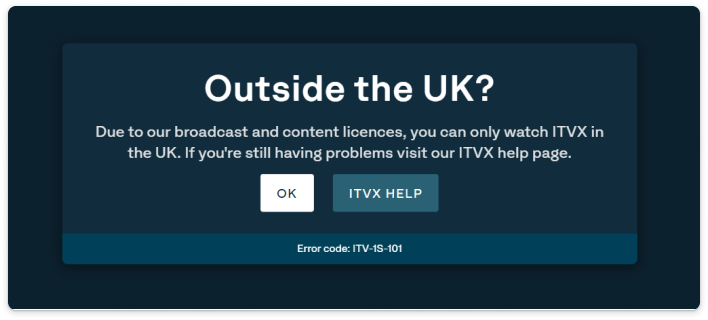
A VPN like GatewayVPN solves this by encrypting your internet traffic and routing it through a secure server in the UK, which masks your real location and provides you with a British IP address. This makes it appear as if you are browsing from within the UK, allowing you to seamlessly access and watch ITVX abroad while also securing your connection on public networks.
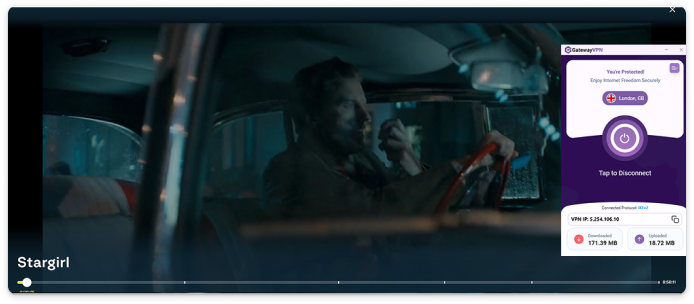
Follow these steps to watch ITVX in Spain or anywhere outside the UK with GatewayVPN:
Following these steps, you can unblock and watch ITVX in Spain or anywhere abroad while maintaining security and online anonymity.
Device | Setup Guide | Supported |
|---|---|---|
Windows | Set up VPN on Windows | |
macOS | Set up VPN on macOS | |
Android | Set up VPN on Android | |
iPhone & iPad | Set up VPN on iOS | |
Smart TVs | Set up VPN on Smart TVs | |
Linux | Set up VPN on Linux | |
Fire TV | Set up VPN on Fire TV | |
Roku | Set up VPN on Roku | |
Chromecast | Set up VPN on Chromecast | |
PlayStation | Set up VPN on PlayStation | |
Xbox | Set up VPN on Xbox | |
Router | Set up VPN on Router | |
Apple TV | Set up VPN on Apple TV |
ITVX is restricted by geo-blocks due to licensing and broadcasting agreements. These contracts require ITVX to limit its content to viewers within the UK. When you travel abroad, your IP address reveals your location, and access is blocked.
GatewayVPN allows you to connect to a secure server located in the UK. This masks your real IP address and provides you with a UK-based one, making it appear to ITVX that you are streaming from within the country, thus bypassing the geo-restriction.
Yes, using a VPN is perfectly legal in most countries, including the UK. VPNs are common tools for online privacy and security. However, it is against ITVX's terms of service to circumvent their geo-blocks. While the risk of account penalty is extremely low, it's important to be aware of their policy.
GatewayVPN is optimized for speed and streaming. Our high-performance UK servers are built to handle HD and 4K video with minimal buffering. In many cases, users experience no noticeable slowdown, and some even see improved speeds if their ISP is throttling streaming traffic.
Absolutely! GatewayVPN offers dedicated apps for all major platforms, including Windows, Mac, iOS, and Android. You can also configure it on your router to protect every device on your home network, like smart TVs and gaming consoles.
Our customer support team is expert in troubleshooting streaming issues. Common fixes include trying a different UK server or clearing your browser's cache and cookies. We guarantee to help you get connected.
Yes! We stand by our service with a risk-free 30-day money-back guarantee. If you are not satisfied for any reason, you can get a full refund with no questions asked.