
BBC iPlayer VPN: How to Watch BBC iPlayer Abroad
- Content verification date: December 13, 2025
Watch BBC iPlayer abroad in 3 Steps:
- Create a GatewayVPN account.
- Install GatewayVPN, and connect to a VPN server in the UK.
- Visit the BBC iPlayer website or download the app and enjoy streaming iPlayer abroad.
30-day money-back guarantee

BBC iPlayer is one of the most popular streaming platforms in the world, but if you try to access it outside the UK, you’ll quickly hit a location error. Whether you’re traveling, living abroad, or trying to stream BBC content from countries like the USA, Spain, India, or Japan, BBC iPlayer is blocked due to licensing restrictions.
What is GatewayVPN?
GatewayVPN enables you to access your favorite streaming services no matter where you are in the world. Additionally, our VPN service enhances your online privacy and security, offering a safer and more unrestricted internet experience.
Is a subscription needed for BBC iPlayer?
No, BBC iPlayer is a free service in the UK.
All trademarks and registered trademarks belong to their respective owners. GatewayVPN™ is not affiliated with or endorsed by any of the services mentioned on our site. Our VPN service is not intended for copyright circumvention. Please review the GatewayVPN Terms of Service and BBC iPlayer Terms of Use for more information.
This means you can’t stream shows, download episodes, or even install the BBC iPlayer app in many regions. In this guide, we’ll show you how to watch BBC iPlayer abroad, explain how a VPN for streaming BBC iPlayer works, and walk you through watching and downloading BBC iPlayer outside the UK on devices like iPad, iPhone, Android, and desktop.
“A VPN hides your real IP address and routes all your traffic through a server in the UK. When you connect via that UK server, BBC iPlayer sees the UK IP and allows access just as if you were inside the UK. Because your real location is masked, iPlayer’s geographic checks can’t detect you’re abroad.”

Can You Watch BBC iPlayer Abroad?
If you’re asking “can you watch BBC iPlayer abroad?”, the short answer is no — not without a workaround. BBC iPlayer is officially available only within the UK, which means anyone trying to access it from abroad will be blocked. This applies whether you’re attempting to stream BBC content on a browser, use the BBC iPlayer app, or access downloads while traveling.
When you try to watch BBC iPlayer outside the UK, the platform checks your IP address to determine your location. If it detects that you’re outside the UK — for example in Spain, the USA, India, or Japan — access is restricted due to broadcasting and licensing rules. As a result, users abroad cannot stream shows, live TV, or even complete a BBC iPlayer download outside the UK without encountering an error.
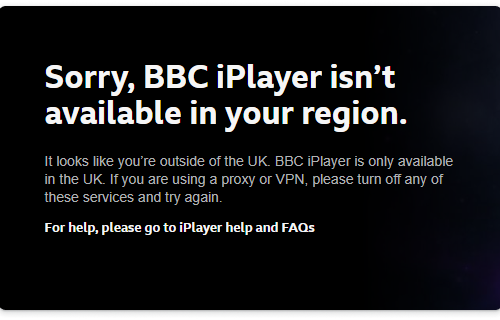
The good news is that it is possible to get BBC iPlayer abroad. By using a reliable VPN that provides UK servers, you can make it appear as if you’re accessing BBC iPlayer from within the UK. This allows you to unblock BBC iPlayer abroad, stream content normally, and access the BBC iPlayer app even when you’re outside the UK.
In the sections below, we’ll explain how to watch BBC iPlayer abroad, which devices are supported, and how to stream or download BBC iPlayer content outside the UK safely and reliably.
Why BBC iPlayer Is Blocked Outside the UK
BBC iPlayer is blocked outside the UK because of content licensing and broadcasting rights. The BBC only has permission to stream its shows, live channels, and on-demand content within the United Kingdom. As a result, if you try streaming BBC iPlayer abroad, the platform must restrict access to comply with these agreements.
When you attempt to access BBC iPlayer from outside the UK, the service checks your IP address to identify your location. If your IP shows that you’re abroad — whether you’re in Europe, the USA, Asia, or elsewhere — BBC iPlayer automatically blocks access. This is why users see errors when trying to watch BBC iPlayer outside the UK or install and use the app abroad.
In the sections below, we’ll explain how to watch BBC iPlayer abroad, which devices are supported, and how to stream or download BBC iPlayer content outside the UK safely and reliably.
Common messages you may encounter include:
- “BBC iPlayer only works in the UK”
- “This content is not available in your location”
- App store restrictions preventing you from downloading the BBC iPlayer app outside the UK
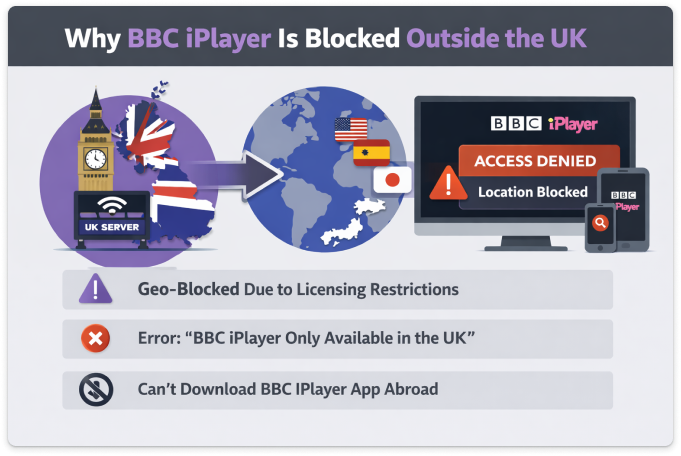
These blocks affect all forms of access. You won’t be able to stream BBC iPlayer abroad, watch live BBC channels, or get BBC iPlayer outside the UK on mobile devices without a solution. Even users who normally live in the UK will face restrictions when traveling internationally, making it impossible to watch BBC iPlayer abroad using a standard internet connection.
This is why many viewers use a VPN when traveling. A VPN allows you to connect through a UK server, giving you a UK IP address so you can unblock BBC iPlayer outside the UK and stream content as if you were back home. In the next section, we’ll explain exactly how to watch BBC iPlayer abroad with a VPN and why it’s the most reliable method.
How to Watch BBC iPlayer Abroad with a VPN
The most reliable way to watch BBC iPlayer abroad is by using a VPN. A VPN allows you to connect to a UK server, which gives you a UK IP address even when you’re physically outside the country. This makes it possible to unblock BBC iPlayer outside the UK and stream content as if you were back home.
Here’s how it works in practice:
Choose a VPN with UK servers
To successfully watch BBC iPlayer with a VPN, the VPN must offer fast and stable UK servers. This is essential for smooth streaming and avoiding buffering when streaming BBC iPlayer abroad.
Connect to a UK server
Once connected, your internet traffic is routed through the UK. This allows you to get BBC iPlayer abroad, access live channels, and stream on-demand content without location errors.
Open BBC iPlayer and start streaming
Visit the BBC iPlayer website or open the app. You’ll now be able to watch BBC iPlayer outside the UK, stream live TV, and access the full content library.
Using a VPN also solves other common issues users face abroad. It enables you to get BBC iPlayer outside the UK, stream BBC abroad on public or private networks, and use the platform securely while traveling. If you’re trying to watch BBC iPlayer abroad on iPad, iPhone, Android, or desktop, the process is the same — connect to a UK server and stream normally.
In the next sections, we’ll cover the best VPN for streaming BBC iPlayer, device-specific setup guides, and how to download BBC iPlayer outside the UK so you can watch your favorite shows anywhere in the world.
Best VPN for Streaming BBC iPlayer Abroad
Not every VPN can reliably stream BBC iPlayer outside the UK. The BBC actively blocks many VPN IP addresses, which means using the wrong service can still result in location errors. To successfully watch BBC iPlayer abroad, you need a VPN that is optimized specifically for streaming and offers consistently working UK servers.
A VPN for streaming BBC iPlayer should meet the following criteria:
- Reliable UK servers that work with BBC iPlayer: To unblock BBC iPlayer abroad, the VPN must provide UK IP addresses that aren’t flagged or blocked by the BBC.
- Fast streaming speeds: High speeds are essential for smooth playback when streaming BBC iPlayer abroad, especially for HD and live TV.
- Apps for all major devices: Whether you want to watch BBC iPlayer abroad on iPad, iPhone, Android, or desktop, the VPN should offer easy-to-use apps across platforms.
- Works for streaming and downloads: A good VPN should allow you to both stream and download BBC iPlayer outside the UK, including access to the BBC iPlayer app when traveling.
GatewayVPN is designed specifically for accessing geo-restricted streaming platforms. With optimized UK servers, stable connections, and simple apps, it makes it easy to watch BBC iPlayer with a VPN, unblock BBC content abroad, and stream without interruptions.
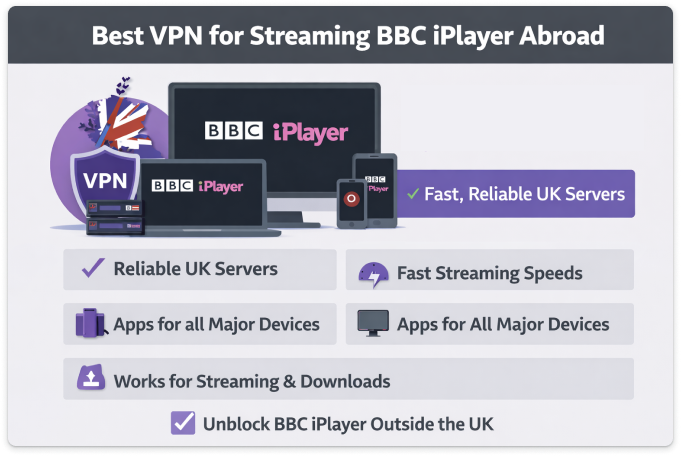
Whether you’re traveling or living overseas, using the right VPN ensures you can get BBC iPlayer abroad, avoid buffering, and enjoy uninterrupted access to BBC shows, movies, and live channels. Next, we’ll walk you through how to watch BBC iPlayer outside the UK on different devices, including iPad, iPhone, Android, and desktop.
How to Watch BBC iPlayer Outside the UK on Different Devices
No matter which device you use, the process to watch BBC iPlayer outside the UK is straightforward as long as you’re connected to a UK server through a VPN. BBC iPlayer works across mobile, desktop, and tablet devices, but the setup steps vary slightly depending on the platform.
Below is a quick overview of how to get BBC iPlayer abroad on the most popular devices.
How to watch BBC iPlayer abroad on Android
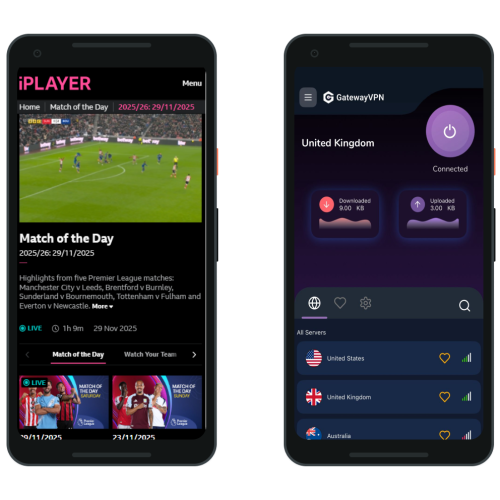
Accessing BBC iPlayer outside the UK is simple with GatewayVPN. Just follow these quick steps to unblock your favorite BBC shows on any Android phone or tablet:
- Download and install the GatewayVPN app from the Google Play Store on your Android device.
- Open the app and sign in to your GatewayVPN account.
- Connect to a UK server to get a British IP address.
- Launch the BBC iPlayer app or visit the iPlayer website in your browser.
- Start streaming BBC content just as if you were in the UK.
How to watch BBC iPlayer abroad on iPhone/iPad
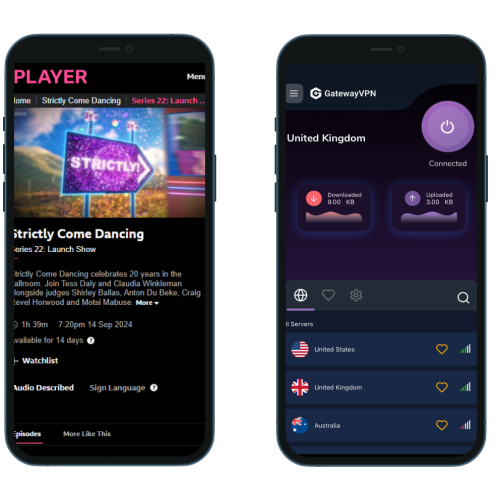
Watching BBC iPlayer on your iPhone or iPad while outside the UK is easy with GatewayVPN. Follow the steps below to unblock iPlayer anywhere:
- Download the GatewayVPN app from the App Store on your iPhone or iPad.
- Open the app and sign in to your GatewayVPN account.
- Connect to a UK server to obtain a British IP address.
- Open the BBC iPlayer app or access iPlayer via your mobile browser.
- Enjoy unrestricted BBC shows and live channels abroad.
How to watch BBC iPlayer abroad on PC browser (Windows/macOS)
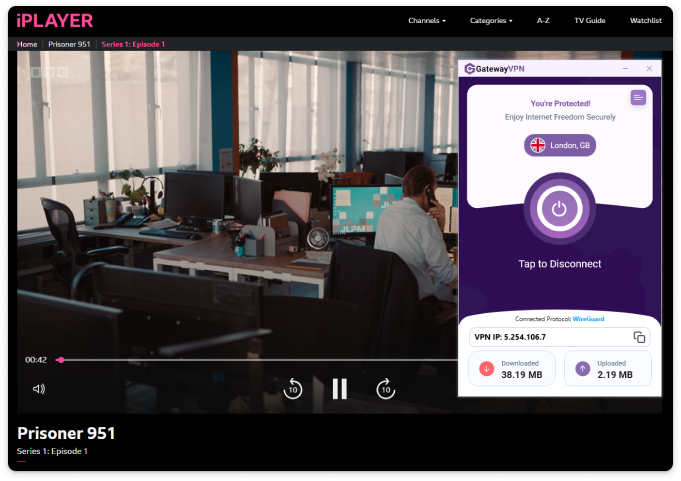
Unblocking BBC iPlayer on your computer is quick and hassle-free with GatewayVPN. Follow these simple steps to start streaming from anywhere:
- Download and install the GatewayVPN app on your Windows or macOS device.
- Launch the app and sign in to your GatewayVPN account.
- Connect to a UK server to get a British IP address.
- Open your preferred browser (Chrome, Firefox, Safari, Edge).
- Visit BBC iPlayer and start watching your favorite UK content abroad.
How to Download BBC iPlayer Outside the UK
Downloading content from BBC iPlayer outside the UK can be tricky, as both the app and its downloads are restricted by location. If you try a BBC iPlayer download outside the UK without a workaround, you may find that the app isn’t available to install or that downloads won’t start.
Here’s how to download BBC iPlayer outside the UK successfully:
Connect to a UK server using a VPN
Before opening the app store or BBC iPlayer, connect to a UK server. This allows you to get BBC iPlayer outside the UK and access download features normally.
Install the BBC iPlayer app outside the UK
If the app isn’t visible in your local app store, a VPN helps you download and install the BBC iPlayer app outside the UK on iOS and Android devices.
Sign in and download content
Once connected to a UK server, open the app, sign in, and download shows or episodes as you would in the UK.
Many users ask, “can I watch BBC iPlayer downloads abroad?” In most cases, downloaded content will only play if BBC iPlayer can still verify a UK location. This means you may need to keep your VPN connected to a UK server to watch your downloads when traveling.
Using a VPN ensures you can get BBC iPlayer abroad, download content before or during your trip, and continue watching without interruptions. In the next section, we’ll look at watching BBC iPlayer in specific countries, including the USA, Spain, India, and Japan.
How to Watch BBC iPlayer Abroad in Different Countries
The steps to watch BBC iPlayer abroad are the same worldwide, but users often search for country-specific guidance because restrictions, app stores, and networks vary. Below is how to get BBC iPlayer outside the UK from some of the most common locations.
How to Watch BBC iPlayer in the USA
If you’re in the United States, BBC iPlayer outside the UK is completely blocked without a UK IP address. To stream successfully:
- Connect to a UK server using a VPN
- Open BBC iPlayer on your browser or app
- Start streaming as if you were in the UK
This also applies if you want to watch BBC iPlayer in the USA on iPad, iPhone, Android, or desktop.
How to Watch BBC iPlayer in Spain (Including on iPad)
Spain is one of the most common locations where users try to watch BBC iPlayer abroad on iPad. Without a VPN, access is blocked instantly.
To watch BBC iPlayer in Spain on iPad:
- Connect to a UK server
- Open the BBC iPlayer app or website
- Stream normally without location errors
The same setup works on iPhone, Android, and laptops.
How to Watch BBC iPlayer in India
BBC iPlayer is not available in India, and you cannot stream or install the app without a workaround. To watch BBC iPlayer in India:
- Use a VPN with reliable UK servers
- Connect before opening BBC iPlayer
- Stream live TV or on-demand content
This method also allows you to get BBC iPlayer abroad on mobile devices where the app is otherwise unavailable.
How to Watch BBC iPlayer in Japan
Users in Japan face the same geo-blocks when streaming BBC iPlayer abroad. Once connected to a UK server, you can:
- Access the BBC iPlayer website
- Use the mobile app
- Watch BBC content on desktop or tablet
This is the most effective way to unblock BBC iPlayer outside the UK from Japan.
No matter where you are — Europe, the USA, or Asia — the key is always the same: connect to a UK server first. In the next section, we’ll cover common BBC iPlayer abroad issues and fixes, including errors, buffering, and VPN detection problems.
Common BBC iPlayer Abroad Issues & How to Fix Them
Even with the right setup, users may occasionally run into issues when trying to watch BBC iPlayer abroad. Most problems are related to location detection, app restrictions, or unstable connections. Below are the most common issues and how to fix them when streaming BBC iPlayer outside the UK.
“BBC iPlayer Only Works in the UK” Error
BBC iPlayer App Not Available or Won’t Install
BBC iPlayer Not Working with a VPN
Buffering or Poor Streaming Quality
BBC iPlayer Downloads Not Playing Abroad
“BBC iPlayer Only Works in the UK” Error
This is the most common message users see when trying to watch BBC iPlayer outside the UK. It means BBC iPlayer has detected a non-UK IP address.
How to fix it:
-
Connect to a UK server using a VPN
-
Refresh the page or restart the app
-
Clear browser cookies or app cache if needed
BBC iPlayer App Not Available or Won’t Install
If you’re trying to download or install the BBC iPlayer app outside the UK, the app may not appear in your app store due to regional restrictions.
How to fix it:
-
Connect to a UK server before opening the App Store or Play Store
-
Refresh the store listing
-
Use the BBC iPlayer website as an alternative if needed
BBC iPlayer Not Working with a VPN
Sometimes BBC iPlayer may block certain VPN IPs, which can prevent you from unblocking BBC iPlayer abroad.
How to fix it:
-
Switch to another UK server
-
Disconnect and reconnect the VPN
-
Use a VPN optimized for streaming BBC iPlayer abroad
Buffering or Poor Streaming Quality
Slow speeds can affect your ability to stream BBC iPlayer abroad, especially for HD content.
How to fix it:
-
Connect to a closer or faster UK server
-
Close background apps or downloads
-
Use a wired connection on desktop when possible
BBC iPlayer Downloads Not Playing Abroad
If you’re asking “can I watch BBC iPlayer downloads abroad?”, playback may fail if the app can’t confirm a UK location.
How to fix it:
-
Keep your VPN connected to a UK server
-
Open the BBC iPlayer app while connected
-
Re-download content if required
By resolving these common issues, you can reliably get BBC iPlayer abroad, avoid errors, and enjoy uninterrupted streaming.
Supported devices for watching BBC iPlayer abroad
Device | Setup Guide | Supported |
|---|---|---|
Windows | Set up VPN on Windows | |
macOS | Set up VPN on macOS | |
Android | Set up VPN on Android | |
iPhone & iPad | Set up VPN on iOS | |
Smart TVs | Set up VPN on Smart TVs | |
Linux | Set up VPN on Linux | |
Fire TV | Set up VPN on Fire TV | |
Roku | Set up VPN on Roku | |
Chromecast | Set up VPN on Chromecast | |
PlayStation | Set up VPN on PlayStation | |
Xbox | Set up VPN on Xbox | |
Router | Set up VPN on Router | |
Apple TV | Set up VPN on Apple TV |
FAQs About Watching BBC iPlayer Abroad
Below are answers to the most common questions users ask about BBC iPlayer abroad, streaming restrictions, and using a VPN to access content outside the UK.
Yes, but not directly. BBC iPlayer is only available in the UK due to licensing rules. To watch it abroad, you need a VPN that provides a UK IP address so you can unblock BBC iPlayer outside the UK.
To watch BBC iPlayer outside the UK, connect to a UK server using a VPN, then open the BBC iPlayer website or app. This works on desktop, mobile, and tablet devices.
BBC iPlayer downloads are also location-restricted. In most cases, you’ll need to stay connected to a UK server to watch downloaded content abroad. Without a UK IP, playback may be blocked.
To complete a BBC iPlayer download outside the UK, connect to a UK VPN server before accessing the App Store or Google Play Store. This allows you to download and install the BBC iPlayer app and access its download feature.
Normally, the app may not appear in app stores outside the UK. A VPN allows you to install the BBC iPlayer app outside the UK by making your connection appear as if it’s coming from the UK.
Yes. Many users successfully watch BBC iPlayer abroad on iPad or iPhone by connecting to a UK server with a VPN before opening the app or website. This also works in countries like Spain and the USA.
Using a VPN is legal in most countries. However, accessing BBC iPlayer abroad may go against the BBC’s terms of use. Users should review local laws and platform terms before streaming.
The best option is a VPN with fast, reliable UK servers that work consistently with BBC iPlayer. A VPN optimized for streaming ensures stable playback and helps avoid detection when streaming BBC iPlayer abroad.