
Summary:
- Your ISP can’t see what sites you visit if you’re using a VPN. A VPN reroutes your internet traffic through an encrypted tunnel. Your ISP can’t see what sites you visit, what you download, what you stream, or any other data about your online activity.
- Your ISP can see that you’re using a VPN. Your ISP knows your IP address and can recognize when it changes, which indicates that you have connected to a VPN server.
- VPN use is perfectly legal and compliant with ISP terms and conditions in most of the world, with the exception of some countries that ban VPNs as a matter of government policy.
ISPs are the source of your internet connection. That allows them to log your entire online activity, including the websites you visit, your search history, your download history, how much time you spend on a website or service, and many other metrics.
Now, you may be asking yourself, Why would ISPs track and log my data? There are many reasons to collect user browsing data, even though it’s expensive to store and analyze.
Mainly, your browsing data is sold to advertisers who then parse it to figure out what you like and send you targeted ads.
This is where a VPN comes in handy. When you connect to a VPN, your IP address is concealed. Your traffic from and to the internet goes through an encrypted tunnel.
This encryption prevents your ISP from seeing what sites you visit or any other data related to your online activity. All they can see is that you connected to a VPN server; from there, it’s a black box for the ISP.
When you connect to a GatewayVPN secure server, your online activity is protected by our no-logs policy. We never record, store, or share any user-related activity. Meaning, we have no idea what you do while connected to our servers, and we’d like to keep it that way!
What data does your ISP see?
ISPs site in an advantageous position in the digital food chain. As the provider of your internet connection, they can detect, filter, and store data about your online activity.
So, what data are they looking for? There are several categories of data that ISPs are interested in collecting and storing.
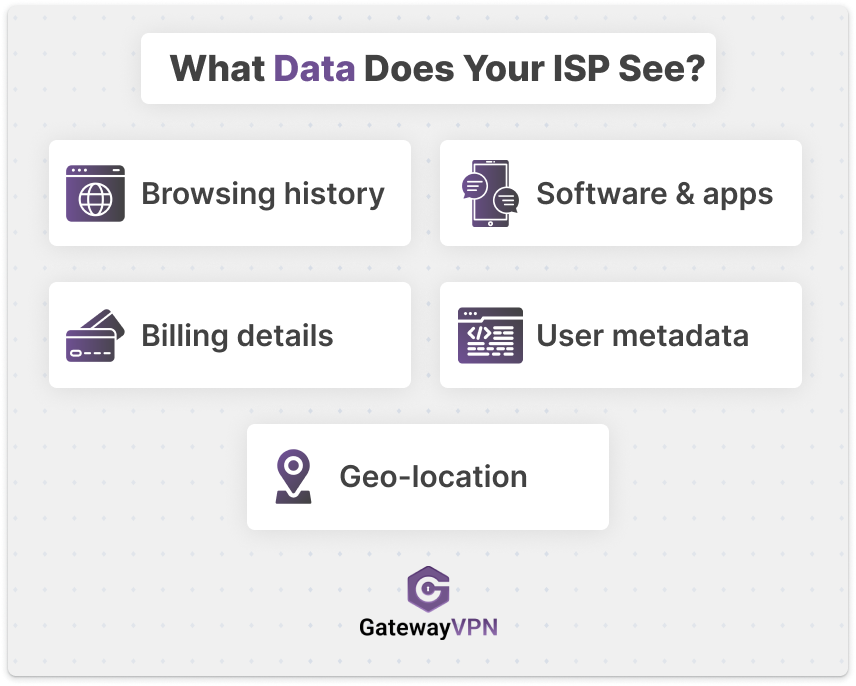
Below, I explain each one in detail, along with examples from my own setup as I experiment with network monitoring and packet inspection tools.
Browsing history
Your browsing history includes the sites you visit, search engine queries, and browser data. Unfortunately, using incognito mode in browsers doesn’t solve this problem. Your ISP can also differentiate between browsing, streaming, gaming, and download traffic.
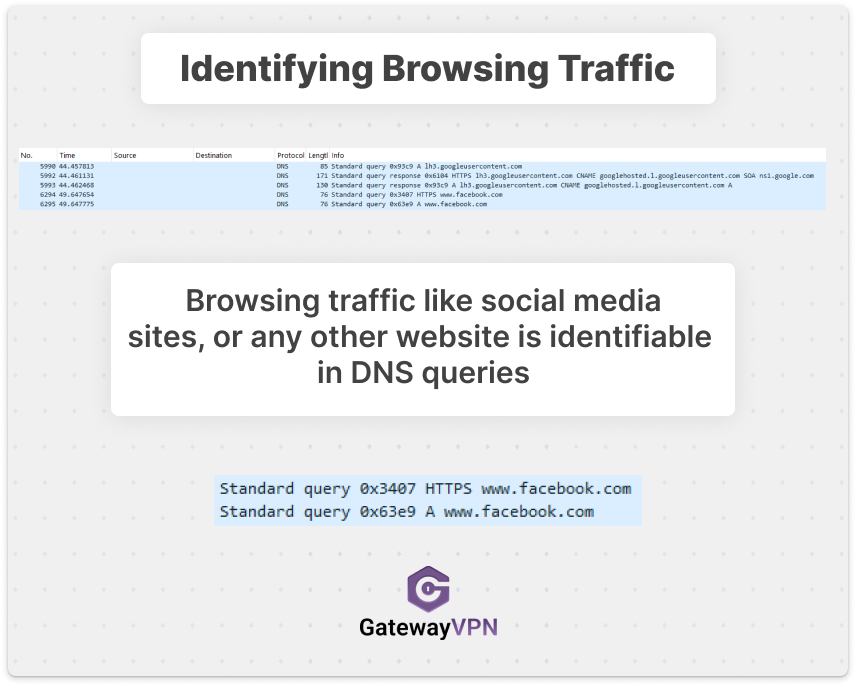
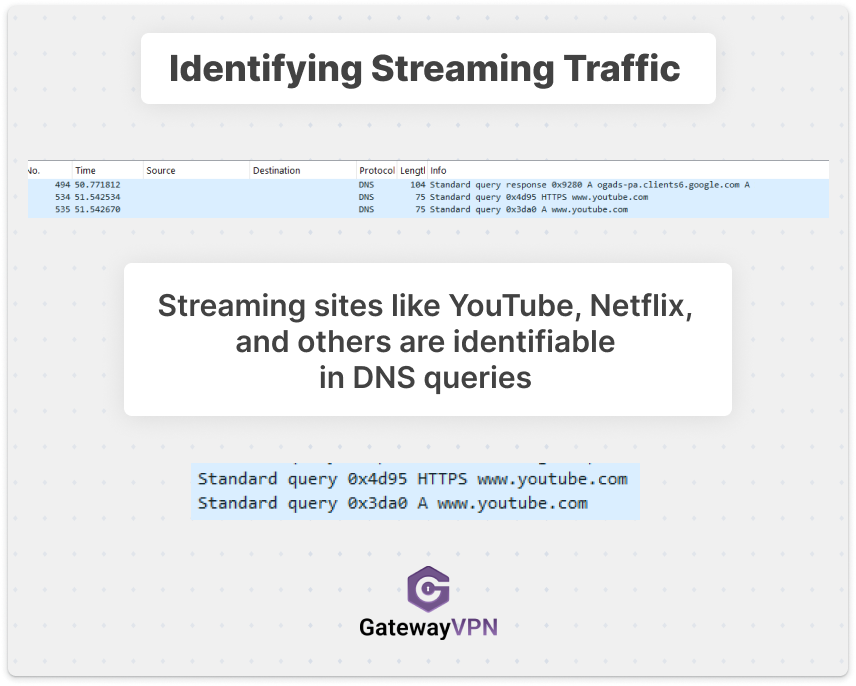
Using deep packet inspection tools, ISPs can filter and identify different types of traffic based on the characteristics of data packets. Below is an example of how each type of traffic appears.
- Browsing: Deep packet inspection tools can identify browsing traffic by inspecting DNS queries and responses to see which domains (e.g., social media or websites) a device is requesting.
- Streaming: Deep packet inspection tools can identify streaming traffic by inspecting DNS queries and responses to spot requests for streaming domains (e.g., YouTube, Netflix) and related CDN hostnames.
- Gaming: Deep packet inspection tools can identify gaming traffic by inspecting DNS queries and responses for game and platform domains (e.g., Steam/Valve hostnames and related CDN domains).
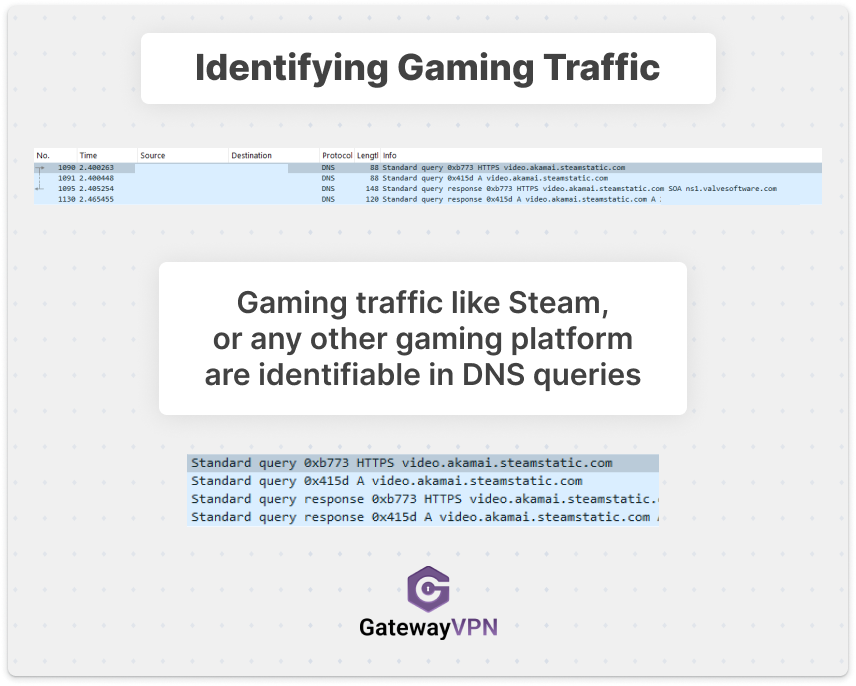
From the collected data, ISPs can track and log how much time you spend on websites. Even if you delete your browsing history regularly, your ISP logs this data at the source and can always access it.
Software and app usage
ISPs utilize deep packet inspection tools to track and analyze network traffic. That allows them to determine which apps or software you’re using.
Your network traffic data reveals every app you use on your mobile devices, tablets, smart TVs, and IoT devices.
Billing details and purchasing habits
If you pay your ISP bill online, then they already have your billing details. But that’s not all, they can track all your online purchases.
Whenever you buy something online or subscribe to a service, you’ll likely go through a checkout page to complete your payment. By analyzing your traffic data, ISPs can filter for checkout pages and payment portals.
Customer metadata
ISPs can track and analyze the metadata from your online connections. This includes the sites you visit, the time you spend on them, and the size and type of data packets being transmitted to and from your device.
Network metadata also reveals information about devices and browsers. It shows data about the devices you connect to the internet with. So, your ISP can tell how many devices you have, and what they are (e.g. mobile, tablet, TV).
Additionally, your browser can also be identified by the metadata (e.g. Chrome, Firefox, Safari).
However, ISPs cannot see the actual content of the data packets. Meaning, they can tell that you have sent an email, but they can’t see the contents of your email.
Geolocation data
Your ISP can also infer your approximate location. They know your service address from the account details, and they can often estimate where you are connecting from based on your public IP address and the network infrastructure you’re using (home broadband vs. mobile data, for example).
They typically won’t see your precise GPS coordinates, but they can build a strong picture of where you live, your usual connection patterns (home vs. work hours), and sometimes your city/region when you’re traveling—especially if you connect without a VPN.
How a VPN hides your data from ISPs
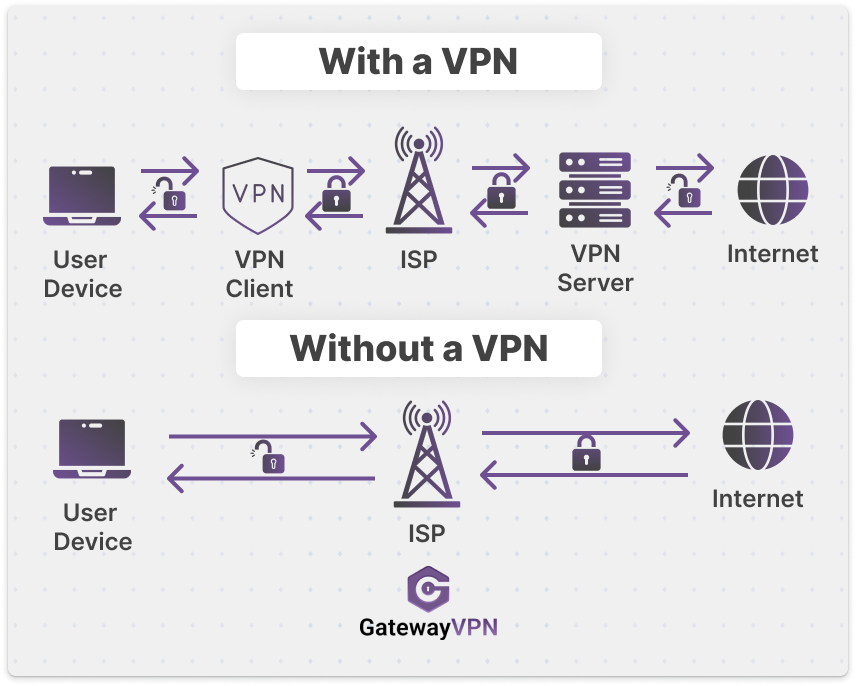
A VPN changes what your ISP can observe by encrypting your traffic before it leaves your device.
Here’s what happens in simple terms:
- Without a VPN: your ISP can see the destination domains you request (via DNS), the IPs you connect to, and the type/volume/timing of traffic.
- With a VPN: your device creates an encrypted tunnel to the VPN server. Your ISP only sees:
- that you’re connected to a VPN server (an IP address owned by the VPN provider), and
- how much data is being transferred and when (metadata).
Everything inside that tunnel—websites you visit, DNS requests, streaming sites, downloads, app activity—is encrypted and hidden from your ISP.
Important note: this protection works best when your VPN also prevents DNS leaks. A good VPN app routes DNS requests through the tunnel so your ISP can’t see the domains you’re looking up.
Can your ISP detect that you’re using a VPN?
Yes. In most cases, your ISP can tell you’re using a VPN, but not what you’re doing with it.
They may detect it through:
- Known VPN server IP ranges: Many VPN providers use identifiable server networks.
- VPN protocols and ports: Some VPN connections have recognizable traffic patterns (even if encrypted).
- A sudden “black box” effect: Instead of seeing many different destination sites, your ISP sees a single persistent encrypted connection to one server.
What they cannot reliably see is which specific websites you’re visiting through the VPN tunnel—because those requests are encrypted and routed through the VPN server.
Do ISPs allow VPN use?
In most countries, yes. VPNs are widely used by businesses, remote workers, students, travelers, and privacy-conscious users.
Most ISPs don’t ban VPN usage in their terms because VPNs are legitimate tools for:
- securing connections on public Wi-Fi
- accessing workplace networks
- protecting privacy from tracking
- reducing exposure to profiling and data collection
That said, some governments restrict or ban VPNs as a matter of policy. In those places, ISPs may be required to block VPN protocols or throttle known VPN traffic.
What are the different types of ISPs?
Not all ISPs operate the same way, and the type of ISP can affect what they can observe and how they manage traffic.
Common ISP categories include:
- Cable ISPs: Shared neighborhood infrastructure, common in cities and suburbs.
- Fiber ISPs: High-speed connections with modern infrastructure and low latency.
- DSL ISPs: Runs over phone lines; slower and more common in older coverage areas.
- Mobile ISPs (4G/5G): Your carrier acts as your ISP; heavy reliance on traffic management.
- Satellite ISPs: Works in rural areas; higher latency and stricter bandwidth policies.
Regardless of type, the core point stays the same: if they provide your internet connection, they’re in a position to log traffic and metadata—unless you encrypt it with a VPN.
Can you trust ISPs with your data?
ISPs are businesses, and in many regions they’re allowed to log and monetize user data within legal boundaries. Even if an ISP claims they “protect privacy,” there are still risks:
- Data retention policies: Some ISPs store connection records for long periods.
- Third-party sharing: Data may be shared with advertisers, analytics partners, or data brokers (depending on local laws).
- Security breaches: Any stored data can become a target.
- Vague privacy policies: Many policies allow broad collection under “service improvement” or “security” language.
A VPN doesn’t make you anonymous, but it does reduce how much your ISP can see and log—especially when paired with good privacy habits (HTTPS, safe browsing, not logging into everything on every device, etc.).
Conclusion
So, can your ISP see what sites you visit with a VPN? No, your ISP can’t see your browsing activity inside the VPN tunnel. They’ll still know you’re connected to a VPN server and can observe basic metadata like bandwidth usage and connection times, but the websites you visit, DNS lookups, streaming platforms, and app activity are encrypted and hidden.
If your goal is to stop ISP tracking and browsing profiling, a reputable no-logs VPN like GatewayVPN is one of the simplest and most effective tools you can use.


 By Nolan A. Pierce
 By Diego Castillo